May 23, 2022
Solved

Application error

  • May 23, 2022
  • 5 replies
  • 0 views

Hello Team,

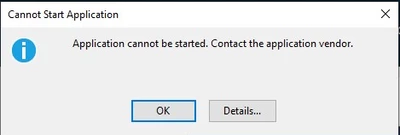
I am unable to open the OneStream application and getting "Application cannot be started" error after downloads.

Expecting solution as soon as possible.

Thank you.

Regards,

Praveen_0-1653308413564.png


Praveen

    Best answer by Sue_T

    Hi Praveen,

    You can try to clear your Clickonce cache. Please refer to https://onestreamsoftware.service-now.com/sp_cloud?id=kb_article_view&sysparm_article=KB0011265

    5 replies

    May 24, 2022

    Hi Praveen,
    We might need more info than that to solve it.
    Are you using the clickOnce or the WindowsApp?
    Are you on premise or in Cloud?
    Did you reisntall it or restart the server?
    Did you try to install from the windows app downloaded from Marketplace?

    PraveenAuthor
    May 24, 2022

    Hi,

    We are using clickOnce.

    In cloud.

    yes. we have restarted system multiple times.

    We are accessing the application through Url.

    Regards,

    Praveen

    PraveenAuthor
    May 24, 2022

    Hello Team,

    Any update on this.

    Regards,

    Praveen

    May 24, 2022

    What OS version are you using? The latest v7? as the installer for v7 as slightly change...
    Have you tried installing from the app directly accessible from the marketplace?
    Have you tried on another computer?
    Please give kudos if it helps.

    PraveenAuthor
    May 24, 2022

    The OS version is 6.6.0.12930.

    we are accessing through URL.

    In another computer it is working fine, some users are facing the issue.

    May 24, 2022

    I am 90% convinced that the issue is linked with the specific computers. It cannot be the server if if is working on other laptops.
    Are those users admin on their laptops?
    If laptops are part of a domain, can they install apps?
    Have you tried from another network, another wifi, another hotspot?

    Have you tried to download the EXE client file from Marketplace and tried to install this one?
    Please give kudos if it helps.

    Sue_TAnswer
    May 24, 2022

    Hi Praveen,

    You can try to clear your Clickonce cache. Please refer to https://onestreamsoftware.service-now.com/sp_cloud?id=kb_article_view&sysparm_article=KB0011265

    PraveenAuthor
    May 26, 2022

    Thank you Sue_T  . The issue has been fixed. 

    September 17, 2025

    Hey,
    For those who still encounter this issue after cleaning the path (as I did) don't forget to check that you are using microsoft edge for the installation. Chrome might be an issue cause aswell.
