August 12, 2022
Solved

Bound List Name and Description in Display Member?

  • August 12, 2022
  • 3 replies
  • 0 views

Hi, 

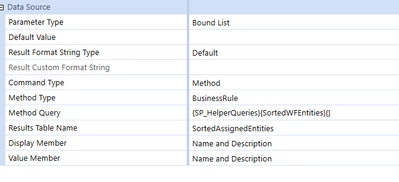
Does anybody know if it's possible to configure a Bound List parameter to show both the Name and the Description as the Display Member?

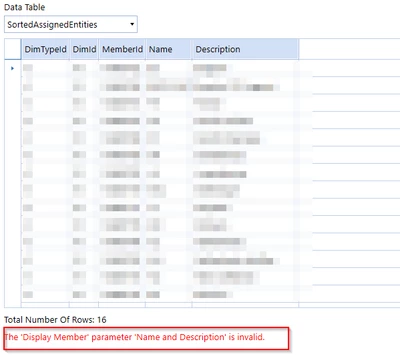
It's valid for Member Lists but I get an error in Bound List parameters.


LeeBown_0-1660321902657.png


LeeBown_1-1660321944200.png

Lee


Best answer by Sai_Maganti

Lee

The return data table must have a column [Name And Description] for this to work. If you use Name or Description it works fine as the data table have both columns. In theory you could use any of the returned columns as Display Member.

Best

Sai

3 replies

August 13, 2022

Lee

The return data table must have a column [Name And Description] for this to work. If you use Name or Description it works fine as the data table have both columns. In theory you could use any of the returned columns as Display Member.

Best

Sai

LeeBAuthor
August 13, 2022

Thanks Sai.

I added a column to the Data Table created by the method query and can now reference that column in my Display Member.


dt.Columns.Add("NameAndDescription", GetType(String), "Name + ' - ' + Description")


Lee

December 18, 2023

Hi LeeB , could I also get a copy of this? paula.crisp@novaadvisory.com

Thank you!!