
November 6, 2024
Solved

CellStatus retrieves a different status than shown in the Cube View

  • November 6, 2024
  • 1 reply
  • 0 views

Hi all,

I'm trying to build a CV with Entities on rows and Scenarios on columns that will show the status of the cell with the help of a Dynamic Calc.

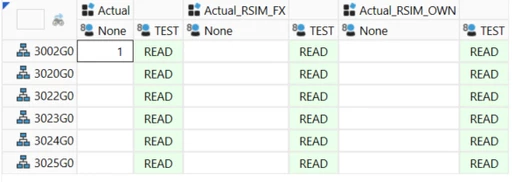
Here's the aspect of the CV (Scenario and UD8 on columns):

gsfeliu_0-1730901997660.png

TEST is my dynamic calc (also crossed with V#Annotation so it can display text). As you can see, I can write on U8#None and yet the dynamic calc returns READ.

Here's my code:

Dim sEntName As String = api.Pov.Entity.Name
Dim sScnName As String = api.Pov.Scenario.Name
Dim sStatus As String = Api.Data.GetDataCell("Cb#CORP:E#" & sEntName & ":C#Local:S#" & sScnName & ":T#2018M1:V#YTD:A#ADDUG:F#None:O#Forms:I#None:U1#None:U2#None:U3#None:U4#None:U5#None:U6#None:U7#None:U8#None").CellStatus.ToString

brapi.ErrorLog.LogMessage(si,"sStatus = " & sEntName & " - " & sScnName & " - " & sStatus)

If sStatus.XFContainsIgnoreCase("WriteAccess: False") Then
	Return "READ"
Else
	Return "WRITE"
End If

Here's the POV of the first cell (on E#3002:S#Actual):

Cb#CORP:E#3002G0:P#?:C#Local:S#Actual:T#2018M1:V#YTD:A#ADDUG:F#None:O#Forms:I#None:U1#None:U2#None:U3#None:U4#None:U5#None:U6#None:U7#None:U8#None

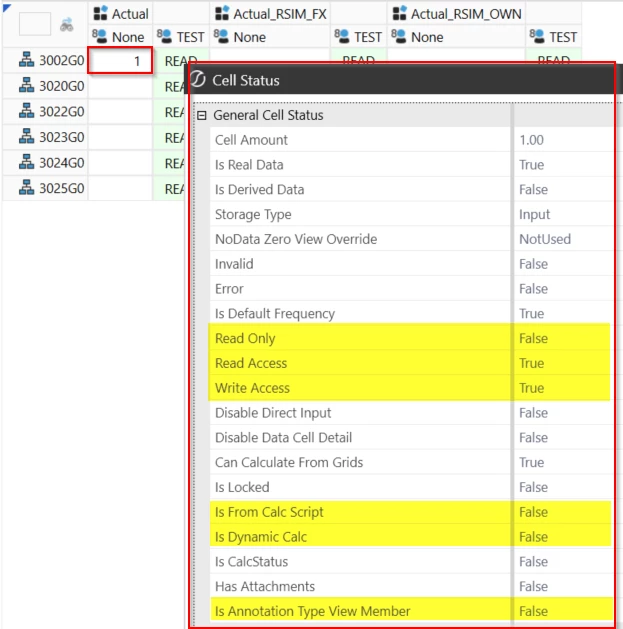
And this is the Cell Status shown in the CV:

gsfeliu_1-1730902326233.png

However, the CellStatus that I'm retriving with my Dynamic Calc says the following (I highlight the incongruences in RED😞

Description: sStatus = 3002G0 - Actual - StoredBits: 33, DerivedBits: 264, ExistenceType=IsRealData, StorageType=Input, NoDataZeroViewOverride: Default, Invalid: False, Error: False, IsDefaultFreq: False, ReadOnly: True, ReadAccess: False, WriteAccess: False, CanCalculateFromGrids: False, IsLocked: False, IsFromCalcScript: True, IsDynamicCalc: False, IsCalcStatus: False

Does anybody have any clues why the CellStatus looks different between the script and the CV?

Thanks,

GSF


Best answer by T_Kress

I wonder if you dimed the cell status as a True or False Boolean like this:

Dim isReadonly = BRApi.Finance.Data.GetDataCellUsingMemberScript(si,"Your YourCube","YourCellPOV").DataCellEx.DataCell.CellStatus.ReadOnly

If Not isReadonly Then
Whatever you want to do
End If

If it would behave differently?

I am doing something similar and it is working for us.

1 reply

T_KressAnswer
November 6, 2024

I wonder if you dimed the cell status as a True or False Boolean like this:

Dim isReadonly = BRApi.Finance.Data.GetDataCellUsingMemberScript(si,"Your YourCube","YourCellPOV").DataCellEx.DataCell.CellStatus.ReadOnly

If Not isReadonly Then
Whatever you want to do
End If

If it would behave differently?

I am doing something similar and it is working for us.

gsfeliuAuthor
November 7, 2024

Thanks Teresa. It worked!

Interestingly, the approach I was following is basically the same. However, the Api syntax for CellStatus returns a different string from the BRApi one that you proposed (and that I'm now using).

For the record, here's a comparison:

Dim sApi = Api.Data.GetDataCellEx(sScript).DataCell.CellStatus.ToString
Dim sBRApi = BRApi.Finance.Data.GetDataCellUsingMemberScript(si,"CORP",sScript).DataCellEx.DataCell.CellStatus.ToString

'*** RESULTS ***
'  Api = StoredBits: 0, DerivedBits: 264,    ExistenceType=NoData, StorageType=NotStored, NoDataZeroViewOverride: Default, Invalid: False, Error: False, IsDefaultFreq: False, ReadOnly: True,  ReadAccess: False, WriteAccess: False, CanCalculateFromGrids: False, IsLocked: False, IsFromCalcScript: True,  IsDynamicCalc: False, IsCalcStatus: False
'BRApi = StoredBits: 0, DerivedBits: 262196, ExistenceType=NoData, StorageType=NotStored, NoDataZeroViewOverride: Default, Invalid: False, Error: False, IsDefaultFreq: True,  ReadOnly: False, ReadAccess: True,  WriteAccess: True,  CanCalculateFromGrids: False, IsLocked: False, IsFromCalcScript: False, IsDynamicCalc: False, IsCalcStatus: False

Also, note the difference in DerivedBits. I wonder what the Api is looking at.

Kind regards,

GSF


November 7, 2024

Strange, but glad it worked!