
June 26, 2024
Solved

Change Zip File Protection settings

  • June 26, 2024
  • 1 reply
  • 0 views

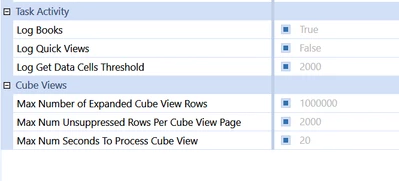
We are on V8.2.2 Cloud and we need to change the Zip File Protection settings. ManageSystemConfiguration is enabled so we can change the settings. The Installation and Configuration guide mentions Zip File Protection settings after Task Activity. Task Activity is there but no Zip File Protection section:

MarcusH_0-1719398011545.png

Anyone know where they are or do I have raise a ticket with support?

Thanks


Best answer by Henning

Hi, I believe you need to open a ticket for that one as a cloud customer. 

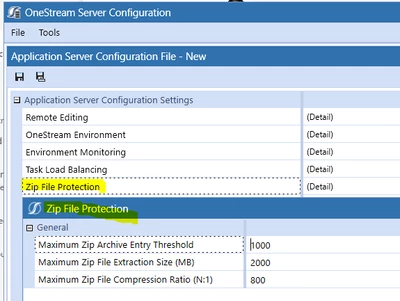
For completeness sake (an in case it helps you locate this under System >> Environment): For On-premise, this can be changed using the OneStream Server Configuration tool in the app server configuration file:


Henning_0-1719398638832.png


1 reply

HenningAnswer
June 26, 2024

Hi, I believe you need to open a ticket for that one as a cloud customer. 

For completeness sake (an in case it helps you locate this under System >> Environment): For On-premise, this can be changed using the OneStream Server Configuration tool in the app server configuration file:


Henning_0-1719398638832.png