April 30, 2024
Solved

Data Cell Access Security (Slice Security) Not Working With Multiple UD Dimensions

  • April 30, 2024
  • 2 replies
  • 3 views

Does anyone have information on how to get Data Cell Access (Slice) Security (henceforth DACS) to work when applying it to multiple UD dimensions?  The app has the entity and scenario security set.  Those are working fine.  If I put only one UD in the DACS, that also works fine.  The problem comes in when subsequent UD dimensions are added to the DACS.  It seems OneStream ignores the DACS and goes back to entity and scenario security.

To add a bit more information, I have tried it multiple ways, with the multiple UDs in the same or different rows in the DACS setup.  It doesn't matter.

Thank you.
Best answer by Krishna

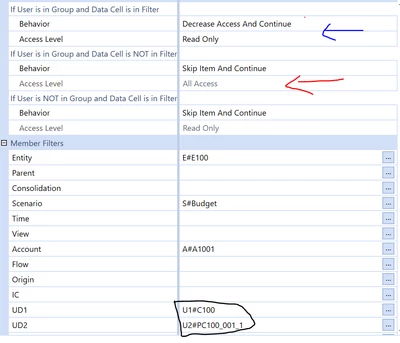
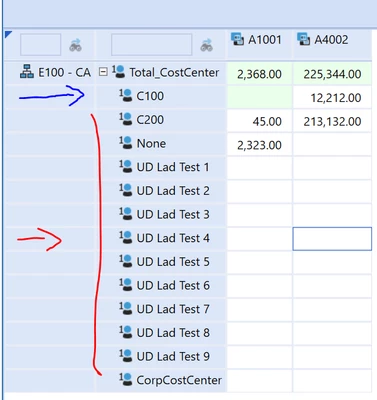
rjgoss  - I tested with the following testing and it is working with multiple UD's. It is simple test but it is working as expected. Refer the screenshot.

Note: You have to set the Behavior if the user in Group with filter and without filter.

Read and Write Output


Krishna_0-1714587281506.png

DACS 


Krishna_1-1714587369459.png


2 replies

May 1, 2024

rjgoss  - As far I know there are no restrictions for the UD's. I would recommend reviewing the OS Foundation Handbook that will provide some information. We need to consider the sequencing. When we define the DACS. 


Krishna_0-1714538701276.png


rjgossAuthor
May 1, 2024

Yes, I did the sequencing like in that example.  Also, none of the examples I've seen use multiple UD dimensions.  They always have entity plus something else (I'm counting Intercompany along with entity in the screenshot included).  I will add some screenshots of what I'm trying to do to this thread.

May 1, 2024

Can you add some screenshots - what works and hat doesn't work.

rjgossAuthor
May 1, 2024

Logically, this should work.


rjgoss_0-1714573155105.png

But as you can see, all UD1 members (second column) are open for editing (this is a partial screenshot, but the others are open too).  Only 65 should be open for editing.


rjgoss_1-1714573295280.png

And even weirder, if you use either of these, the line shown in the bottom screenshot is open for editing even though the Access Group in the bottom row of the DACS setup should NOT have access to any UD2 members, of which one is selected in the QuickView POV.


rjgoss_2-1714574106578.png

rjgoss_3-1714574121747.png

rjgoss_4-1714574149754.png


KrishnaAnswer
May 1, 2024

rjgoss  - I tested with the following testing and it is working with multiple UD's. It is simple test but it is working as expected. Refer the screenshot.

Note: You have to set the Behavior if the user in Group with filter and without filter.

Read and Write Output


Krishna_0-1714587281506.png

DACS 


Krishna_1-1714587369459.png