August 14, 2024
Solved

Disable Force Consolidate via Forms

  • August 14, 2024
  • 2 replies
  • 2 views

Is there a way to disable the "Force Consolidate" option from the forms? 
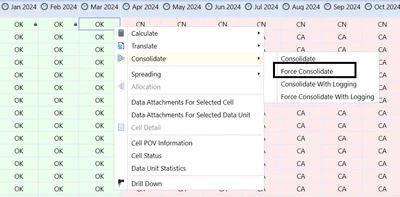
FC.png

Best answer by TheJonG

I don't believe there is. As a workaround, you could embed this Cube View in a simple dashboard with a button at the top that is set to only Consolidate and then set Can Consolidate to False in the Cube View properties. 

2 replies

TheJonGAnswer
August 14, 2024

I don't believe there is. As a workaround, you could embed this Cube View in a simple dashboard with a button at the top that is set to only Consolidate and then set Can Consolidate to False in the Cube View properties. 

SaraBAuthor
October 9, 2024

Hi again.

We are trying to avoid force calculation and consolidation in a native way, I mean, through dashboards, but the "force" option is available in quickviews. Do you know if there is a way to disable these options in a quick view?

Regards,

August 15, 2024

I agree with TheJonG - I don't think you can remove the Force Consolidate from the menu. You could stop the Force Consolidate from executing though by using a wcfEventHandler. Have a look at this:

https://community.onestreamsoftware.com/t5/Rules/Is-it-possible-to-prevent-a-force-consolidation-to-run-on-locked/m-p/6399


SaraBAuthor
August 26, 2024

Hi Marcus,

Thanks for your reply. I have done some tests with this rule and it works, but I was trying to avoid using the eventhandler for this and so use something more "native".

Regards,
