
Dynamic File Naming Based on Dashboard Selection
Hello All,
I have created a dashboard that includes the following features:
1. A combo box for selecting the year.
2. A button to initiate a backend process.
3. A button to retrieve an Excel file (using web content component).
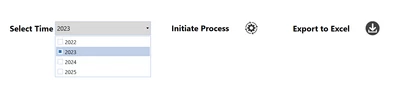
This dashboard has been integrated into a workflow. I am working on a requirement where the generated Excel file should be named as "scenarioName_YearChosenInDashboard". For instance, if the years 2022 and 2023 are selected in the dashboard and the "Plan" scenario is chosen in the workflow, the file should be named "Plan_2022_2023".
I have managed to fetch the scenario from the workflow, but I am currently facing challenges in retrieving the selected year(s) from the dashboard.
Could you please assist me in resolving this issue?
Thank you.