
July 11, 2024

Flipping a Sign

  • July 11, 2024
  • 1 reply
  • 3 views

Hello,

I just need help flipping a sign on a final report. 

Here is the data:
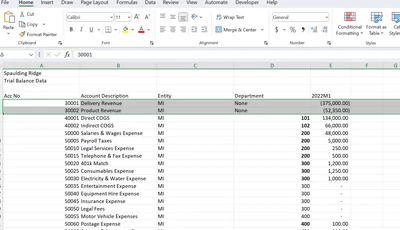

wm2_0-1720709501237.png

Here is the report (there is a negative sign in front of the number insert):
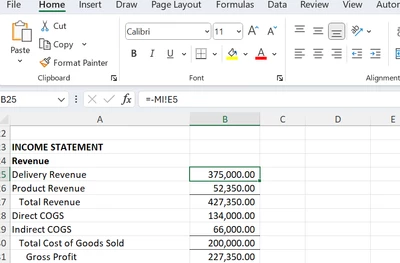

wm2_1-1720709542997.png

And here is what my OneStream is showing:
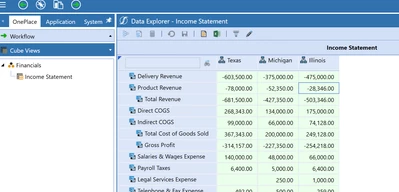

wm2_2-1720709579956.png

I went into transformation rules and flipped the sign on those 2 accounts, but that did not help:
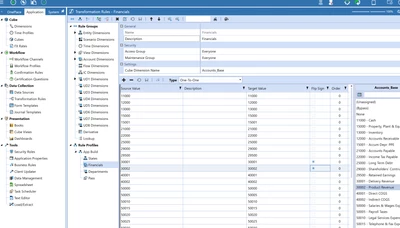

wm2_3-1720709618325.png

Does anyone have any suggestions? Thank you!


1 reply

July 11, 2024

My first question is, what do you have as your account type for 30001 and 30002 in OneStream?  Assuming those are type:  Revenue, and that when the data comes in from an ERP it is naturally a credit balance, you will want to flip the sign of those 2 (or any revenue or liability) accounts in your transformation rules so that they show in OS as positive.

This is because OS is a reporting tool, not a ledger tool so revenue and liabilities in OS naturally show as positive, even though in the ERP they are natural credits.

After flipping the sign in transformation rules and reloading your data, you will then want to consolidate.

If you follow those steps those 2 accounts (or any revenue or liabilities) will show as positive on OS reports.

If you are trying to create a trial balance view with debits and credits, you can write a dynamic U8 calculation that will flip your OS type revenue and OS type liabilities on reports back to show credit balances. But that is typically done via a dynamic U8 as shown below:


T_Kress_0-1720710051271.png


wm2Author
July 11, 2024

I needed to re-upload the data thank you very much.

Last thing, how can I get Tot Rev - COGS instead of them adding?


wm2_0-1720711737497.png


July 11, 2024

Again, it should work assuming TOT REV is type:  Revenue and COGS is type:  Expense.   The two positive numbers in OS will naturally subtract.  It is all based on account type.