March 27, 2024
Solved

Grid Layout

  • March 27, 2024
  • 4 replies
  • 0 views

In dashboard grid layout . What does the value in column width represents?

1. *

2. Difference between auto and * ?

3. How is the scale of the width measurement ? what is the total width of the screen?

4. What does 2* means ?
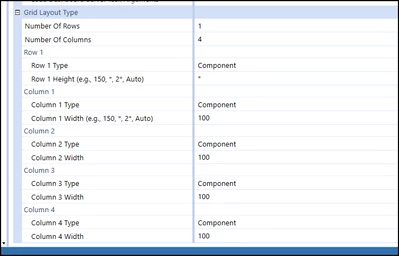

OS_Pizza_0-1711528682149.png


Best answer by RobbSalzmann

My experience with this is:

1. *
Tells the grid to make this row or column use the remaining space

2. Difference between auto and * ?
Auto sizes the row or column based on the component size within, * just makes the row use whats left  whether it fits the component or not.

3. How is the scale of the width measurement ? what is the total width of the screen? 
Measurement is in pixels.  

4. What does 2* means ? 
If you have two columns (or rows) where one is * and the other is 2*, the second 2* column will always be 2 times wider than the * column.

4 replies

March 27, 2024

My experience with this is:

1. *
Tells the grid to make this row or column use the remaining space

2. Difference between auto and * ?
Auto sizes the row or column based on the component size within, * just makes the row use whats left  whether it fits the component or not.

3. How is the scale of the width measurement ? what is the total width of the screen? 
Measurement is in pixels.  

4. What does 2* means ? 
If you have two columns (or rows) where one is * and the other is 2*, the second 2* column will always be 2 times wider than the * column.

March 27, 2024

All correct, just some extra detail... Technically, * (star) is a flexible unit of measurement.

Let's say I have 4 columns, defined as *, 3*, 2*, and 4*, and an available space that is 800 "pixels" wide. The system will sum up all stars (1+3+2+4 = 10); then divide the available space by that value (800 / 10 = 80), and assign to each column that amount multiplied by the number of stars it has (80 x 1, 80 x 3, 80 x 2, 80 x 4).

The nice bit is that this calculation gets performed every time the dashboard is resized, making interfaces responsive while maintaining proportionality between them.

These sizes, btw, come directly from Microsoft libraries. There is a page, somewhere in their docs, describing exactly what a "pixel" is.

OS_PizzaAuthor
March 27, 2024

Thanks Robb ! That should go in the D&R guide.

October 8, 2024

This is a great thread as these concepts have always been a little unclear to me.  Say you have a grid with 1 column and 2 rows and you want the two rows to take up half the screen not matter how large the contents are of each row.  Is there a way to do that?

October 10, 2024

You actually need 3 rows in that case, and to set their heights to *, *, and 2*. This way, the system will divide the screen in 4 sections, allocate 2 of them to the bottom row, and one each to the other rows.

(You might have to place something in that row, like a transparent image or label, otherwise the system might not display the row in some cases). 

EDIT: sorry, I might have misread what you want - i interpreted your text as "I want half the screen to go to the rows, and the other half to stay blank". If instead you meant "I want each row to have half the screen", just have 2 rows with their heights set to * and *. The system will split the available space in two sections and allocate one to each row.

October 14, 2024

Unfortunately JackLacava only the 2-3 users who have participated on this thread will see your response because the post was created in March and this forum doesn't bump 'most recently replied to' posts to the top the way most forums do.
