
April 1, 2026
Solved

Hierarchy Validation tool Security

  • April 1, 2026
  • 2 replies
  • 0 views

We have added a power user who has the ability to manage some dimensions, however they cannot access the hierarchy validation tool and receive the error

Security Access Error.  User XXXX is not authorized to access object 'OneStream Database Server'.

I tried changing the access in the workspace but this did not resolve the error.

What areas need to be changed to allow access?


Best answer by JJones

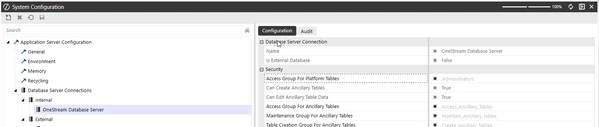
The user needs to be in the group that is assigned to the Access Group for Ancillary Tables for the OneStream Database Server.


You can view the group that is assigned to this security from within the System Tab > System Configuration > Database Server Connections and click on the OneStream Database Server, this will show what group is currently assigned to the Access Group for Ancillary Tables.  

2 replies

JJonesAnswer
April 1, 2026

The user needs to be in the group that is assigned to the Access Group for Ancillary Tables for the OneStream Database Server.


You can view the group that is assigned to this security from within the System Tab > System Configuration > Database Server Connections and click on the OneStream Database Server, this will show what group is currently assigned to the Access Group for Ancillary Tables.  

April 1, 2026

My guess is that they need access to ancillary tables since I believe that tool sets up database tables.

Make sure they are in the group assigned here: