
April 6, 2025

How to Run Workspace Assembly from a Data Management Step In 6 Easy Steps

  • April 6, 2025
  • 9 replies
  • 1 view

This was originally a question.It took a while to figure out, so to save someone else the hours of trial and error, here is the process I use in detail, start to finish, to run a Workspace-based Data Management step in a Workspace Assembly business rule.

Here's a How-to step by step:
List of abbreviations used below:
DM: Data Management
WS: Workspace
MU: Maintenance Unit
BR: Business Rule
AS: Assembly

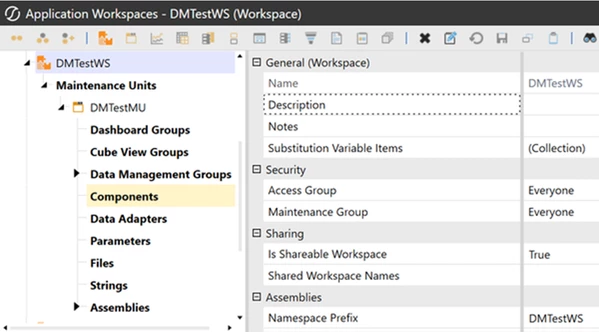
1. Workspace:Set the NameSpace Prefix - this is what gets filled in at runtime for __WSNameSpacePrefix


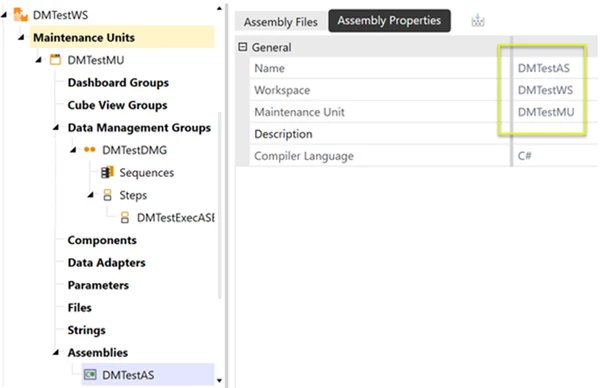
2. Assemblies: Note these properties


3. Create the Assembly Business Rule:Create an "Extender" business rule, this is done by right clicking files and selecting "Extensibility Rules"
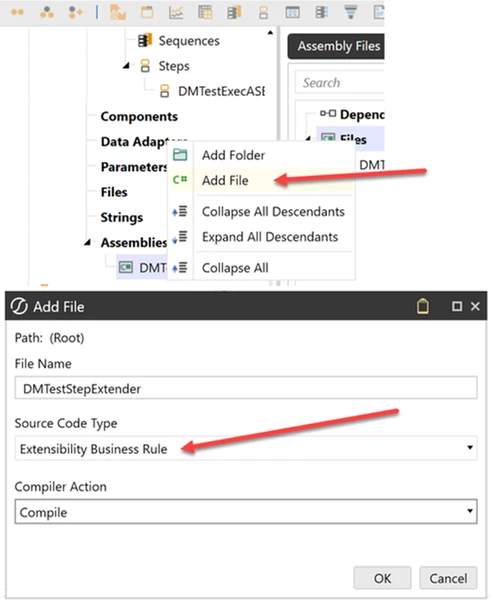


Add some test code, to verify correct configuration, such as BRApi.ErrorLog.LogMessage(si, "Hello from the new extender!"then code the way you would any other extender


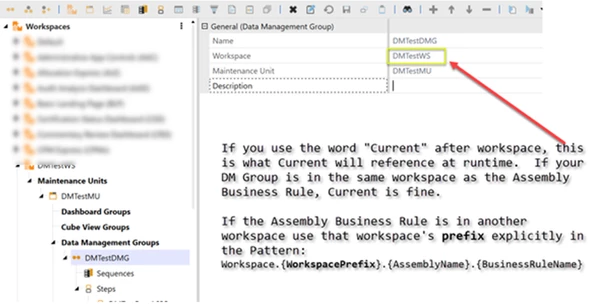
4. Create The Data Management Group: Create a DataManagement Group in the same workspace that the Assembly that has your business rule is in


5. Create a Data Management Step -  Create a DM step in the new DM Group, reference the rule using the pattern:
Workspace.{WorkspacePrefix}.{AssemblyName}.{BusinessRuleName}

In this case it would be: Workspace.Current.DMTestAS.DMTestStepExtender
Note: we could also use 'DMTestWS' instead of 'Current'.We use Current because the DM Step is in the same WS as the Extender Rule.
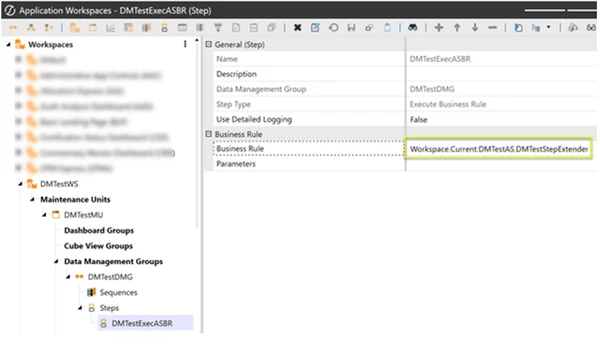


7. Done! Test the DM Step with run button and check the error log(System Tab -> Logging -> Error Log),for your test code's output.


9 replies

April 6, 2025


Data Management Step


April 6, 2025


Workspace Assemblies


April 6, 2025

The above is for Assemblies-BR.
To use a Assemblies-DM Step Services (DMSS) in a Service Factory (SF), pls try the two links
Calling a WS Assembly from Data Management Step | OneStream Community
Service Factory - Data Management Step | OneStream Community
- thank you for the advice there
- only one SF-DMSS for now

April 6, 2025
  • Thank you for the replies,  I noticed "Extenders" in your assembly structure, and that got me thinking.  


April 6, 2025

Yes - Robb - on the Assemblies-BR option.
For the one SF-DMSS option, pls confirm below that is similar to what you've done.


1. Create a DMSS
April 6, 2025


2. Create a SF to activate 1. DMSS
April 6, 2025


3. Link the WS to the DM Step
April 6, 2025


4. Activate 2. SF in 3. WS
September 7, 2025

Thank you for sharing. This is super helpful.
Have you, or anyone else, been successful calling an XFBR String Service from a POV setting in a Data Mgmt step. In this case i have an XFBR String Service that creates the Time Memberfilter dynamically based on the Ranged Scenario.
So far i have not figured out the correct parameters for XFBR(). My code is in a Service Factory at the Maintenance Unit.  First tried something like
WSMU.FactoryName, FctName, Parameters but got "Invalid parameter. Time Filter XFBR(etc.). 
Also tried XFBR(Workspace.Current.AssemblyName, FctName, Params). Same error.

Thanks in advance

September 7, 2025

Found an example in Planning Framework (PLF). But it is not an XFBRString Service but a good old BR, albeit in the Assembly.


Worked perfect.