
December 1, 2023
Solved

How To Trigger Dashboard Refresh from SQLTableEditor Save Data Server Task (Save button)

  • December 1, 2023
  • 6 replies
  • 0 views

The SQLTableEditor in question is used for user interactive CRUD pertaining to Rates used in a calculation.

Use Case:
I have a SQLTableEditor that holds rates.  When the table Save button is clicked, A BR saves the rates and runs a calculation.  The results of the calculation are displayed in an adjacent dashboard containing a DataGrid.  The DataGrid needs to be refreshed after the Save button is clicked.

Question:
How do I configure the SQLTableEditor to refresh the adjacent dashboard on clicking the Save Button, in a way similar to configuring the "Save Action" of other components?
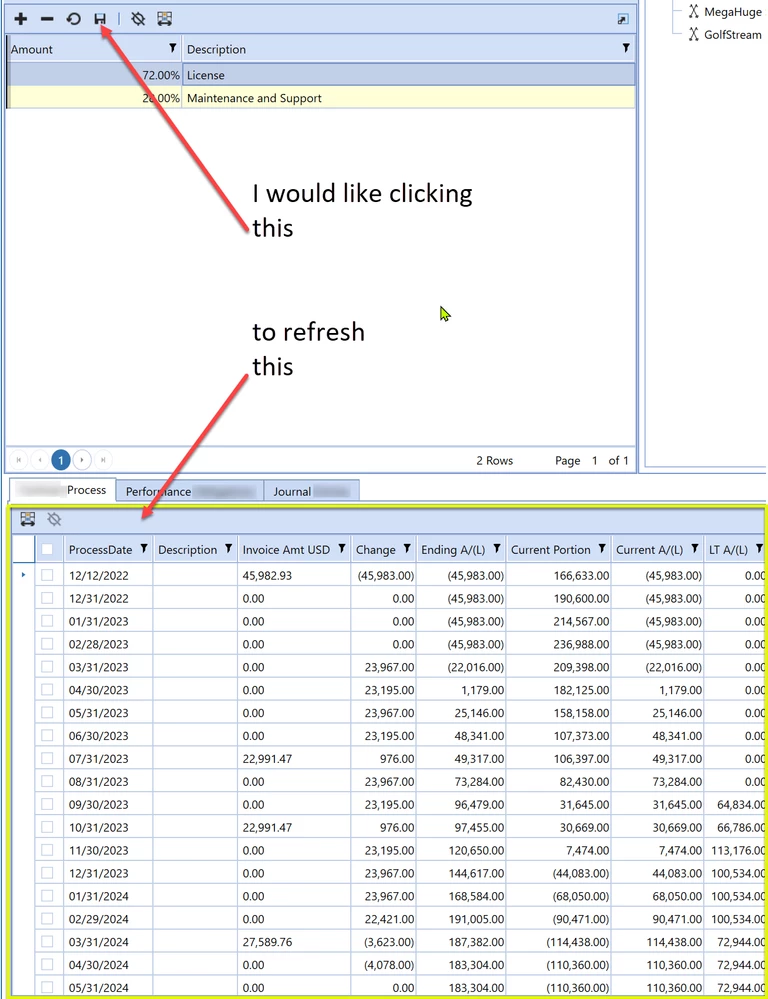

RobbSalzmann_0-1701450757499.png


Best answer by RobbSalzmann

Thanks db_pdx 

 I do have an extra button to refresh my table.  This extra button confusing to the users.  Its not a natural UX action to click a Save button and then have to click an update button.  Save should do the updating.  The point of this is I should not need an extra button to refresh the ui after clicking a save button.  

6 replies

December 1, 2023

Hi RobbSalzmann ! 
Hope you are doing fine.
I am just thowing at you an idea I did not test : Have you tried with a Save Data Event Handler ? This is run in order to track all save events in an application.
If it captures your save, then you could throw a refresh of the gridview.
I know it is super theoretical ðŸ˜€ but I have not time to test now. I could not find any info in Golfstream App!
Keep me posted.
Nic

December 1, 2023

Hi NicolasArgente Can you help me understand how to specify a "Save Data Event Handler" in SQLTableEditor?

I'm probably staring straight at it and can't see it. 😛


December 1, 2023

Robb, just go to your favorite part of OS : Creating a business rule. Select like below : 


NicolasArgente_0-1701451756564.png

My understanding is that anytime you save something into OS, it will check that BR. It might be an overkill. But if you click the save, it should look at this SaveDataEventHandler. Once again, never tried and to be honest, i can not find any info on it!


December 1, 2023

Nicolas,
I tried doing this.  When I click the Save button in the SQLTableEditor, this event handler is not called.  I verified this with a print to the error log:


RobbSalzmann_0-1701452621411.png


February 23, 2024

Late to the party ... but I think this Event only runs when you Save Cube Data

February 23, 2024

pls help us understand what you mean by Save Cube Data? Is it something we can trigger here, IOW, how you would 'Save Cube Data' while working in a SqlTableEditor? 

December 1, 2023

Edit: not working with the light testing I performed

Hi Robb: I'm going to throw another untested idea at you. In brief, create a custom Save Data Task that triggers a Selection Changed UI task as the final step (which would hopefully achieve the refresh you want).

  • The SQL Table Editor has the default option for custom save events in the component properties under 'SQL Table Editor > Server Task'.
  • You specify the custom save task in a DashboardExtender BR under the function type DashboardExtenderFunctionType.SqlTableEditorSaveData.
    • I believe this requires that you specify the full custom save logic.  Edit: not needed, the default code available within the SqlTableEditorSaveData works without needing modification.
    • You can probably reference CPP / PLP BR's for how this works.
  • Then the crux of the concept. After the actual custom save logic, pop a New XFSelectionChangedUIAction. From the snippet editor: Dim objXFSelectionChangedUIActionInfo As New XFSelectionChangedUIActionInfo(selectionChangedUIActionType, dashboardsToRedraw, dashboardsToShow, dashboardsToHide, dashboardForDialog). Hopefully that will trigger your desired refresh.
    • Edit: the above does not work in the testing I did.

I might try and mock this up if I have time today.

December 1, 2023


RobbSalzmann_0-1701465621128.png

Same here, bummer.  I had hope for minute there ... ðŸ˜†

The problem is the TaksResult objects.  The XFSqlTableEditorSaveDataTaskResultTaskResult lacks these two properties needed for this to work:
XFSelectionChangedUIActionInfo? ModifiedSelectionChangedUIActionInfo { get; set; }
bool ChangeSelectionChangedNavigationInDashboard { get; set; }

The SQLTableEditor seems to be a one-off component in dashboards, like a brother from another mother.  It also uses a different TaskResult type than everything else.

December 1, 2023

Its not your exact requirement but... what about putting that first table in a pop-up dialog box via a button?  That way when you close the dialog you can have it trigger a refresh as buttons have 'Open Dialog, Apply Changes, and Refresh' as an option.

RobbSalzmannAuthorAnswer
December 1, 2023

Thanks db_pdx 

 I do have an extra button to refresh my table.  This extra button confusing to the users.  Its not a natural UX action to click a Save button and then have to click an update button.  Save should do the updating.  The point of this is I should not need an extra button to refresh the ui after clicking a save button.