
December 22, 2024
Solved

Is there a way to hide the OnePlace Pane?

  • December 22, 2024
  • 1 reply
  • 0 views

A client doesn't want some users to see the OnePlace Pane and just navigate based on their landing page. There is an application security role for it and I updated that group to a specific group so its not set to everyone. When I test the user role that doesn't have the OnePlace Pane in their security roles, its not working and the OnePlace Pane is still showing up?
Best answer by T_Kress

I can confirm, based upon my testing and the testing of one other colleague, this Application User Interface Role in fact does not control anything.  I will record this as a bug since we believe this role was added but not coded so currently it has no bearing on the app itself.  Therefore, I do not believe you can hide the OnePlace Pane.  

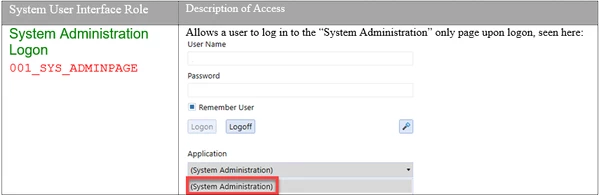
As a side note -- if you have a person that should only see the System tab, you can grant them the following security and when they log in, they will not be in a specific app nor have a OnePlace pane:


1 reply

T_KressAnswer
January 6, 2025

I can confirm, based upon my testing and the testing of one other colleague, this Application User Interface Role in fact does not control anything.  I will record this as a bug since we believe this role was added but not coded so currently it has no bearing on the app itself.  Therefore, I do not believe you can hide the OnePlace Pane.  

As a side note -- if you have a person that should only see the System tab, you can grant them the following security and when they log in, they will not be in a specific app nor have a OnePlace pane:


January 6, 2025

Thats what I was thinking! Thank you for confirming my suspicion.

January 6, 2025

A bug has been logged:  PF-33761