
April 30, 2025
Solved

Manual input not possible on one scenario but possibile on another

  • April 30, 2025
  • 3 replies
  • 0 views

Hi everyone, I'm having problems in writing data to one scenario through a cubeview. 
I have 2 scenarios available. If in the cubeview I use one of them, it allows me to manually input data. If I change the scenario, I cannot input data anymore. All the other dimensions are base members and they are unchanged.
In addition, I cannot find the setting to allow data input on one specific scenario. I checked the settings of both scenarios and they are identical.
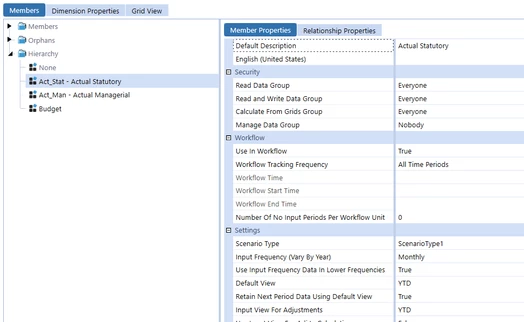


Does anyone have any idea how to do it?

Thanks!

Best answer by T_Kress

There are many things you may need to check:

  1.   Are the two scenarios the same scenario type
  2.   If not do both scenarios have a Forms step that is Active = "True"
  3.   Are you using WF channels?
  4.   If you are using WF channels is there a forms step Active = "True" for the forms WF channel
  5.   Are you using any no input BRs or Data Access Security on the cube?
  6.  Are you using C#Aggregated for input in the cube view and if so is that set to True for the scenario property?


I am assuming you are using the same cube view but there is a setting on the cube view which is Can Modify Data = True.

My starting point to trouble shoot would be to right click on the intersection and look at the Cell Status and see if that helps shed any light.

3 replies

T_KressAnswer
April 30, 2025

There are many things you may need to check:

  1.   Are the two scenarios the same scenario type
  2.   If not do both scenarios have a Forms step that is Active = "True"
  3.   Are you using WF channels?
  4.   If you are using WF channels is there a forms step Active = "True" for the forms WF channel
  5.   Are you using any no input BRs or Data Access Security on the cube?
  6.  Are you using C#Aggregated for input in the cube view and if so is that set to True for the scenario property?


I am assuming you are using the same cube view but there is a setting on the cube view which is Can Modify Data = True.

My starting point to trouble shoot would be to right click on the intersection and look at the Cell Status and see if that helps shed any light.

May 1, 2025

Do you have workflow created for Scenario 2? I would go to cube->assigned workflow prefix ->Create a workflow profile

fc5Author
May 8, 2025

Hi both, thank you for the reply!

The problem was indeed the forms step, it was set to Active = "False" for that scenario. Now it works fine! Thank you for the help