March 22, 2024
Solved

Okta Bearer Token for API call

  • March 22, 2024
  • 2 replies
  • 0 views

Hi Community,

We are trying to set up Rest API call to execute Data Management (OneStream v8.1) call from external system (e.g. Postman)

I followed the document for REST_API_Implementation_Guide.pdf and I am not able to configure the Bearer Token (we are using Okta as Single Sign-on). 

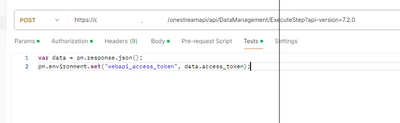
seangly_0-1711131948080.png


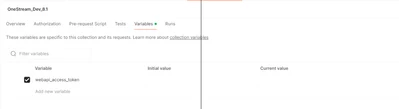
seangly_1-1711131970442.png

This is not working,  I am wondering if something need to be done on the Okta beside the steps in the document;


Best answer by DanielWillis

I've only used Azure so don't have an example. A quick google didn't seem to be super helpful but it looks like there are a few video tutorials about it.

Basically you create a new request which connects to Okta and will retrieve a new bearer token. On the test tab of that request you have your set variable command which you tried above. Most likely this bearer token will have a timelimit of say 60 minutes so you will need to run it every time you want to test things, prior to running your OneStream request.

Then on your OneStream request you will populate your bearer token variable into the bearer token field.

2 replies

Employee
March 24, 2024

Which part isn't working exactly? What are you encountering?

Looking at your screenshots it kinda looks like you're trying to get a bearer token from your ExecuteStep call instead of before the ExecuteStep call?

Based on what you're doing, you should be doing a call to get the Bearer token from Okta, using your code to store it in a variable on the test tab, then using that variable in the ExecuteStep call

seanglyAuthor
March 25, 2024

Hi Daniel,

That is correct, I am doing it in the same call.  I am not familiar with Postman so when you says doing a call to get the Bearer token from okta, will have a sample on the setup?  

That is my missing part, getting the Bearer token before I can execute any Api to OneStream.

Regards,

Seang

Employee
March 25, 2024

I've only used Azure so don't have an example. A quick google didn't seem to be super helpful but it looks like there are a few video tutorials about it.

Basically you create a new request which connects to Okta and will retrieve a new bearer token. On the test tab of that request you have your set variable command which you tried above. Most likely this bearer token will have a timelimit of say 60 minutes so you will need to run it every time you want to test things, prior to running your OneStream request.

Then on your OneStream request you will populate your bearer token variable into the bearer token field.

April 4, 2024

Are you using OneStream Identity Server? I believe it is required for v8+ in the cloud.

If so, you will need to create personal access tokens in OneStream and place them directly in the authorization tab in Postman.

Access the Manage Personal Access Tokens Page (onestream.com)

seanglyAuthor
April 8, 2024

It is a two steps process once the Okta has been configured correctly:

1. We were able to get the bearer token using the correct Okta link and save it into a variable (Postman)
2. USed that vairable in the bearer token (Authentication tab) to call OS API to execute DM job

April 8, 2024

Per this documentation, I believe that all customers v8 and above will use OIS, which no longer has the steps of getting the bearer token and uses the personal access token. If you are able to get bearer tokens to work on v8+, then I would be interested to know about it as this would be a deviation from my understanding.

OneStream Identity Server (OIS) Content - OneStream Community (onestreamsoftware.com)