
February 19, 2024
Solved

OnPrem and RestApi : Help for the config

  • February 19, 2024
  • 4 replies
  • 1 view

Hi there!

I am trying to use Postman to run a DM job sequence. 
I test the DM job locally and it works fine with no parameter.
I am using Azure SSO to log on the server.
I can retrieve a token from microsoft for my tenant ID using : 
https://login.microsoftonline.com/bec456-my-t3n4nt-id-e2aba/oauth2/v2.0/token (In green in the printscreen)

On my second RestApi call, I use the token I retrieved and I drop the token under Authorization > Bearer Token in Postman.
Because I need to run a sequence the URL is : https://aiqos.io:50001/onestreamapi/api/DataManagement/ExecuteSequence?api-version=5.2.0 
and the body is :

{
"BaseWebServerUrl": "https://aiqos.io:50001/onestreamweb",
"ApplicationName": "GolfStreamV65",
"SequenceName": "RestApi",
"CustomSubstVarsAsCommaSeparatedPairs": ""
}

I also created an admin user in OneStream that matches the Application (client) ID found in Azure. (In red in the printscreen)
The on the back end in the server config, I added the OS Werb Api Cliend ID and the Web Api App Custom Scopes. (in red and yellow)
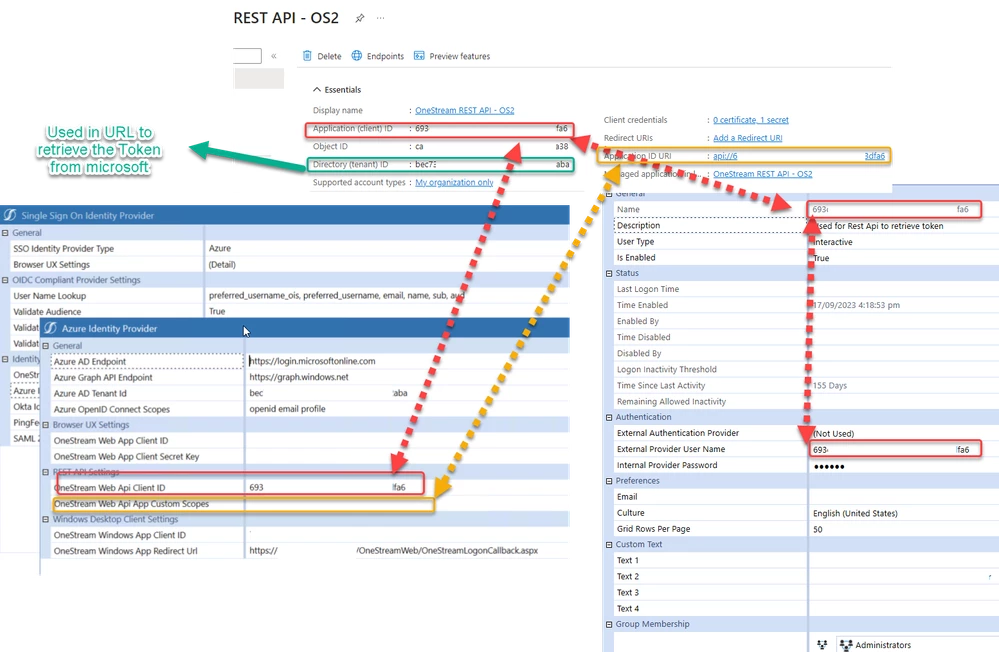

RestAPi.png

When I run the RestApi for the DM Sequence, I get an error 500.
I have no clue on what I am missing after reading few times the doc. I used to make it work for previous OS versions...
I see that the api is reaching the  windows server , but nothing in the OneStream logs...
Thanks for your help.

Best answer by NicolasArgente

OK, I managed to make it work. I redid everything from scratch and it worked. Dont ask me why 🙂

4 replies

February 19, 2024

Edited: subvars is indeed a single string.  pbbbb. 🙂
Couple of quick things to try:
add the proper case and  trailing slash to the basewebserverurl, and use an empty object for subvars instead of an empty string.:  

{
"BaseWebServerUrl": "https://aiqos.io:50001/OneStreamWeb/",
"ApplicationName": "GolfStreamV65",
"SequenceName": "RestApi",
"CustomSubstVarsAsCommaSeparatedPairs": ""
}


Employee
February 21, 2024

I leave off the OneStreamWeb, so would have:

"BaseWebServerUrl": "https://aiqos.io:50001/",
February 22, 2024

Thanks DanielWillis  !
I also tried that but it is not working. 
I am on OS v8.1 by the way. 
Can you check on your side the username I put in OS? Did I made a mistake...? 

February 21, 2024

Hi RobbSalzmann Thanks for your help, but it does not change anything. Still getting the 500 errors. Remember that the call is received by the windows server but OS not.

NicolasArgenteAuthorAnswer
February 28, 2024

OK, I managed to make it work. I redid everything from scratch and it worked. Dont ask me why 🙂

Employee
February 29, 2024

Argh, gotta hate that. A mixture of wth this sucks and I don't care it works at last I'm never looking back.


February 29, 2024

^^^ this!  Been there too. Gah!

February 29, 2024

ahahha! Exactly Daniel. Thanks!