
September 11, 2023
Solved

Org-By-Period in multi-cube application

  • September 11, 2023
  • 3 replies
  • 2 views

Has anyone gained experience with the 'org-by-period' consolidation in a multi-cube application?

We are currently addressing changes in organizational structure. Specifically, we need to consolidate one of the entities within a single cube up to month 10 and in a different cube thereafter. We have a primary cube and several segment cubes that roll up into it, utilizing the extended Entity dimension.
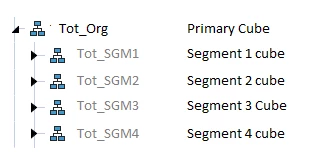

Elena_0-1694467413087.png

The initial challenge I'm encountering is related to adding the entity to a different cube hierarchy. Does anyone have insight into how to resolve this?
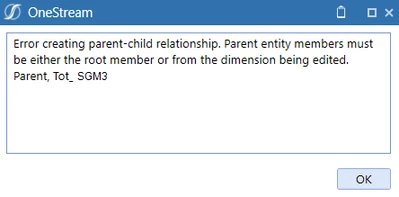

Elena_1-1694467445307.png

Once the entity is added to the second hierarchy, I plan to update the Consolidation Algorithm to 'Org-By-Period Elimination,' set 'Percent consolidation' in both hierarchies, and change the consolidation view to 'Periodic.' I would greatly appreciate any insights on how to resolve the existing error and what to expect or pay attention to in the next steps.

Best answer by RyanB

The recommended approach here would be to rename the entity in the old segment relationship to be a historical member and then create the entity in the new segment with the current name. Since the Entity is rolling to the Tot_Org from two different sub-cubes the org-by-period functionality cannot be applied. For this functionality to work with the appropriate multiple relationships and consolidation percent settings, the entity needs to reside in the same cube. From there the entity could have relationships to different parent cubes. So an option would be to have a 3 tiered cube structure, where the base entity would be connected to a higher level segment cube with varying time/consolidation properties. 

3 replies

September 12, 2023

Are you typing out the parent name? That error message seems to have a space after "_", which would break the lookup. Try selecting members from the ellipses menu instead.

ElenaAuthor
September 12, 2023

Hi Jack,

I copy an entity and then use 'Paste Relationship (Add)' to the desired location. There's no chance for a typo.

The space in the error message is because I'm replacing the actual entity name in the screenshot.


September 12, 2023

Ok, I see what's happening: you're copying and pasting across a dimension that is composed of various dimensions, and your source and target dimensions are different. Yeah, you cannot do that.

What you can do, however, is:

  1. identify which dimensions actually contain the new parent and the new child (i.e. where each member is not greyed out). It's called the Member Dimension in member Properties, in this case it's "HoustonEntities":
    JackLacava_1-1694530310909.png
  2. Open the Dimension that actually contains the parent
  3. Select the parent and click Add Relationship for Selected Member
    JackLacava_0-1694530176623.png
  4. In the menu, select the child from the dimension that actually contains it.

You'll have to pay attention to not creating circular dependencies though. If you plan to continue using the same cubes where you already have data, data for the child member will still be stored in the same child cube.

ElenaAuthor
September 12, 2023

Now, when the entity is in the desired place, I can update its relationship properties in both hierarchies. Also, the consolidation view should be switched to Periodic. What consequences should I anticipate after changing the Consolidation View for the Scenario from YTD to Periodic in the application with existing data? 

September 12, 2023

That's above my paygrade 😅 I would say take backups and test in your development environment. Changing the consolidation view will very likely impact a lot of rules though, assuming a moderately complex application.

ElenaAuthor
September 12, 2023

Thank you, Jack! I'll test and share the results here.

ElenaAuthor
September 12, 2023
To sum up, having the same entity in two cubes doesn't appear to be a viable option unless I overlooked any crucial settings or configurations.
The below error popped up during consolidation after I updated Relationship Properties in both hierarchies, changed Consolidation Algorithm Type to 'Org-By-Period Elimination' in all cubes, and set Scenario's Consolidation View to 'Periodic':

Elena_2-1694537418552.png
I am going to add a new entity to solve this. Meanwhile I would appreciate it if anyone with experience in multi-cube applications could share their insights and advice on the best approach to consolidating one entity in one cube for part of the year and in another cube afterward.
RyanBAnswer
September 12, 2023

The recommended approach here would be to rename the entity in the old segment relationship to be a historical member and then create the entity in the new segment with the current name. Since the Entity is rolling to the Tot_Org from two different sub-cubes the org-by-period functionality cannot be applied. For this functionality to work with the appropriate multiple relationships and consolidation percent settings, the entity needs to reside in the same cube. From there the entity could have relationships to different parent cubes. So an option would be to have a 3 tiered cube structure, where the base entity would be connected to a higher level segment cube with varying time/consolidation properties. 

ElenaAuthor
September 12, 2023

Ryan, many thanks for your help on this.