November 6, 2025
Solved

Programmatically hide dashboard Tabs

  • November 6, 2025
  • 6 replies
  • 5 views

Hi all,

I want to manage tabs on a dashboard in a programmatically way, showing/hiding them based on the result of an XFBR call (or similar).

Can someone point me in the right direction, please ?

Thanks in advance

Regards

FabioG

Best answer by JackLacava

This is the simplest approach (there are others).

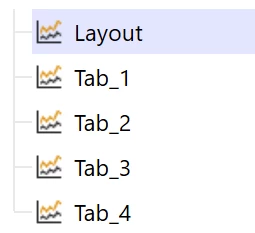
Have a "Layout" dashboard of type Embedded Dynamic Repeater, with Layout Type set to Tabs.

Have your other dashboards of type Embedded


Create a Component "TabTemplate" of type Embedded Dashboard, and set a variable in the Embedded Dashboard property.
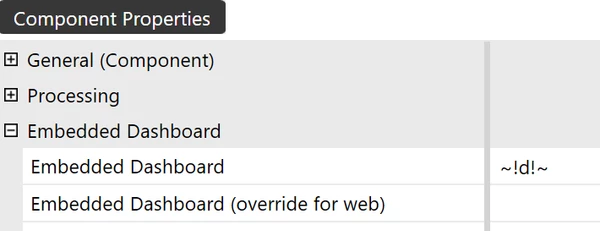


Assign that component to the Layout dashboard



Now create your "MyTabAssembly" assembly, containing a Dynamic Dashboard Service "MyDynDashService".

This is the core of the technique: in the GetEmbeddedDynamicDashboard method, manipulate the ComponentTemplateRepeatItems list to define items; for each item, the variable we used in our Embedded Dashboard component will be populated to point to a particular dashboard.

Public Function GetEmbeddedDynamicDashboard(ByVal si As SessionInfo, ByVal api As IWsasDynamicDashboardsApiV800, ByVal workspace As DashboardWorkspace, _
            ByVal maintUnit As DashboardMaintUnit, ByVal parentDynamicComponentEx As WsDynamicComponentEx, ByVal storedDashboard As Dashboard, _
            ByVal customSubstVarsAlreadyResolved As Dictionary(Of String, String)) As WsDynamicDashboardEx Implements IWsasDynamicDashboardsV800.GetEmbeddedDynamicDashboard
            Try
                If (api IsNot Nothing) Then
					If storedDashboard.Name.XFEqualsIgnoreCase("Layout") Then
						' get the dashboard
						Dim layoutDashboard = api.GetEmbeddedDynamicDashboard(si, workspace, parentDynamicComponentEx, storedDashboard, String.Empty, Nothing, TriStateBool.Unknown, WsDynamicItemStateType.Unknown)
						' build an item definition with suffix and variable values
						Dim newTab = New XFDynamicDashboardTemplateItemDefinition("t1", "d=Tab_1")
						' manipulate the list 
						layoutDashboard.DynamicDashboard.ComponentTemplateRepeatItems.Add(newTab)
						' return the dashboard
						return layoutDashboard
					Else
                    	Return api.GetEmbeddedDynamicDashboard(si, workspace, parentDynamicComponentEx, storedDashboard, String.Empty, Nothing, TriStateBool.Unknown, WsDynamicItemStateType.Unknown)
					End If
                End If

                Return Nothing
            Catch ex As Exception
                Throw New XFException(si, ex)
			End Try
        End Function

To clarify, and if you want to test manually before using code, this snippet is manipulating this property on the Layout dashboard:



Effectively doing the same as:
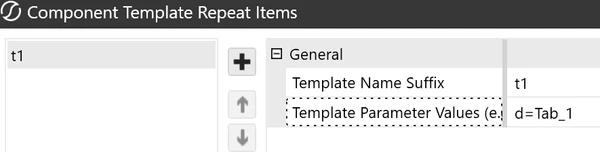


Now create your Service Factory and enable your service as usual
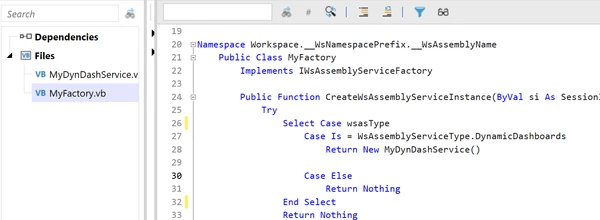


Execute it in Designer mode, and you'll see that the dashboard includes your tab.


If you want more tabs, just add (or remove) items from that ComponentTemplateRepeatItems list. If you want to drive it with Parameters (e.g. the number of tabs, or anything else), you will find them in the customSubstVarsAlreadyResolved dictionary.

6 replies

November 9, 2025

Hi FabioG​ 

You can leverage both XFBR or dynamic dashboard, the later being programmatically oriented.

If you want to work with XFBR, I would use the XFBR in an "embedded dashboard" component, where the XFBR function will output the name of the dashboard you would like to see. This XFBR would be driver by an input parameter that would be defined for the button you would click to activate them (or as a Load Dashboard function).

In order to show/hide dashboard, you can also use the XFBR directly in the Dashboard layout, in a form where your XFBR will output True or False. It will look like: " IsVisible= XFBR(MyXFBRrule,MyXFBRfunction,[MyParam1=MyParamValue1]).

I hope it will point you to the right direction ! :)

Regards,

FabioGAuthor
November 10, 2025

Hi Sergey​,

thanks for Your answer.

Sorry maybe my question wasn't so clear: I want to hide/unhide Tab's BUTTONS (not the tabs themselves).

Anyway, I replicated the Tabs logic using buttons that appear/disappear based on a configuration, dynamically linking them to configurable dashboards (what I wanted hide/unhide were the buttons - or, better, the tab's buttons).

So you're confirming that, in the Tabs Layout Type, there's no way to programmatically hide/unhide Tab's Buttons (and thus I followed the right path).

Thanks

Best Regards

FabioG

November 10, 2025

Hello FabioG​ 

You can actually hide / unhide buttons on a dashboard, programmatically, using dynamic dashboards in workspace assemblies. The XFBR is the easiest way :)

Regards,

Employee
November 11, 2025

Just confirming what Sergey said, This was an example of the power of dynamic dashboards, where you could truly hide/show content rather than a 'soft' hide which often left you with formatting issues / blank space. 

FabioGAuthor
November 11, 2025

Hi all,

what I want to show/hide is not the content... While using the Tab Layout, I'd like to show/hide tab buttons programmatically, like adding/removing underlying dashboards. These are not buttons (or components) on a dashboard, they are part of the control.

AFAIK this cannot be done programmatically.

Suppose I have Tab1, Tab2 and Tab3. In certain conditions I want to hide Tab2 button, so the tab control has only 2 tabs available. I was able to do so implementing removing the Tab layout and adding a set of buttons that I can show/hide programmatically.

Regards

FabioG

November 11, 2025

It is OneStream, so anything is possible :)

I agree with JackLacava​ about look and performance of tabs. 

You could also probably achieve what you want by simply using an embedded dashboard approach.  For example if each tabbed dashboard layout was represented by a different dashboard, you could just show the one you want based on your condition(s) e.g. pass that value to the embedded dashboard via a parameter or onload event. 

Since your tabs are basically embedded dashboards, they could be reused between your different dashboard layouts and you would avoid handling all the micro actions to show/hide different elements within a single dashboard

This no/low code approach has a bit less finesse, but I believe would achieve the same effect :D

Hope this helps

Sam

FabioGAuthor
November 13, 2025

Ok guys, looks like I have to dig deeper into Dynamic Dashboard too !

Thanks a lot for Your precious answers!

regards

FabioG

January 21, 2026

JackLacava​ 
I stumbled on your posts and attempted to implement the Repeater to dynamically show/hide tabs but was unsuccessful.
Could you please share and example?

Thank you in advance!

January 22, 2026

This is the simplest approach (there are others).

Have a "Layout" dashboard of type Embedded Dynamic Repeater, with Layout Type set to Tabs.

Have your other dashboards of type Embedded


Create a Component "TabTemplate" of type Embedded Dashboard, and set a variable in the Embedded Dashboard property.


Assign that component to the Layout dashboard


Now create your "MyTabAssembly" assembly, containing a Dynamic Dashboard Service "MyDynDashService".

This is the core of the technique: in the GetEmbeddedDynamicDashboard method, manipulate the ComponentTemplateRepeatItems list to define items; for each item, the variable we used in our Embedded Dashboard component will be populated to point to a particular dashboard.

Public Function GetEmbeddedDynamicDashboard(ByVal si As SessionInfo, ByVal api As IWsasDynamicDashboardsApiV800, ByVal workspace As DashboardWorkspace, _
            ByVal maintUnit As DashboardMaintUnit, ByVal parentDynamicComponentEx As WsDynamicComponentEx, ByVal storedDashboard As Dashboard, _
            ByVal customSubstVarsAlreadyResolved As Dictionary(Of String, String)) As WsDynamicDashboardEx Implements IWsasDynamicDashboardsV800.GetEmbeddedDynamicDashboard
            Try
                If (api IsNot Nothing) Then
					If storedDashboard.Name.XFEqualsIgnoreCase("Layout") Then
						' get the dashboard
						Dim layoutDashboard = api.GetEmbeddedDynamicDashboard(si, workspace, parentDynamicComponentEx, storedDashboard, String.Empty, Nothing, TriStateBool.Unknown, WsDynamicItemStateType.Unknown)
						' build an item definition with suffix and variable values
						Dim newTab = New XFDynamicDashboardTemplateItemDefinition("t1", "d=Tab_1")
						' manipulate the list 
						layoutDashboard.DynamicDashboard.ComponentTemplateRepeatItems.Add(newTab)
						' return the dashboard
						return layoutDashboard
					Else
                    	Return api.GetEmbeddedDynamicDashboard(si, workspace, parentDynamicComponentEx, storedDashboard, String.Empty, Nothing, TriStateBool.Unknown, WsDynamicItemStateType.Unknown)
					End If
                End If

                Return Nothing
            Catch ex As Exception
                Throw New XFException(si, ex)
			End Try
        End Function

To clarify, and if you want to test manually before using code, this snippet is manipulating this property on the Layout dashboard:


Effectively doing the same as:


Now create your Service Factory and enable your service as usual



Execute it in Designer mode, and you'll see that the dashboard includes your tab.
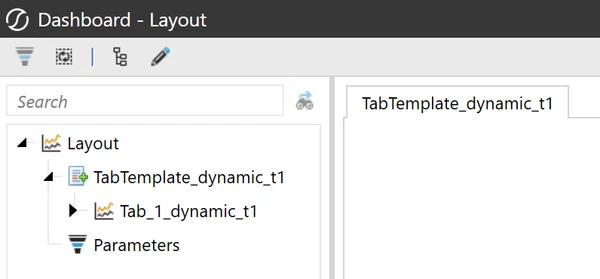


If you want more tabs, just add (or remove) items from that ComponentTemplateRepeatItems list. If you want to drive it with Parameters (e.g. the number of tabs, or anything else), you will find them in the customSubstVarsAlreadyResolved dictionary.
