
July 31, 2023
Solved

Set the value of a radio button on a dashboard

  • July 31, 2023
  • 1 reply
  • 0 views

Hi All

I am updating the Admin Consolidations Dashboard (ADM) so that only some users can execute a Force Consolidate. I can hide the radio button group if the user does not have access but I am struggling to update the radio button group (Consolidate/Force Consolidate) so that the correct option is selected. 

The list of values for the radio button is controlled by a parameter (pm_ConsolType_ADM). In the LoadDashboard event I have updated this parameter using SetLiteralParameterValue (using v6.8). I am assuming that this is how the radio button selection is controlled as I can't find anywhere else where it can be set. If I click on the 'Reset parameter selections' it works.

I have tried unsuccessfully to Redraw the dashboard like this:

Dim selectionChangedTaskResult As XFSelectionChangedTaskResult = New XFSelectionChangedTaskResult()
selectionChangedTaskResult.ModifiedSelectionChangedUIActionInfo.DashboardsToRedraw = "2_1_AutomationTasks_ADM"

Any help you can give me is much appreciated. Thanks
Best answer by RobbSalzmann

In a DashboardExtender rule you can set the selected radio button in your RBG having values (Calc, Consol, Force) in a parameter called MyRadioButtonGroupParam to consol by:


Dim taskResult As XFSelectionChangedTaskResult = New XFSelectionChangedTaskResult() With {
    .IsOK = True,
    .ShowMessageBox = False,
    .Message = "",
    .ChangeSelectionChangedUIActionInDashboard = False,
    .ChangeSelectionChangedNavigationInDashboard = False,
    .ChangeCustomSubstVarsInDashboard = true,
    .ChangeCustomSubstVarsInLaunchedDashboard = False
}

taskResult.ModifiedCustomSubvars("MyRadioButtonGroupParam") = "Consol"

Return taskResult


This will change the selected radio to the "Consol" item.

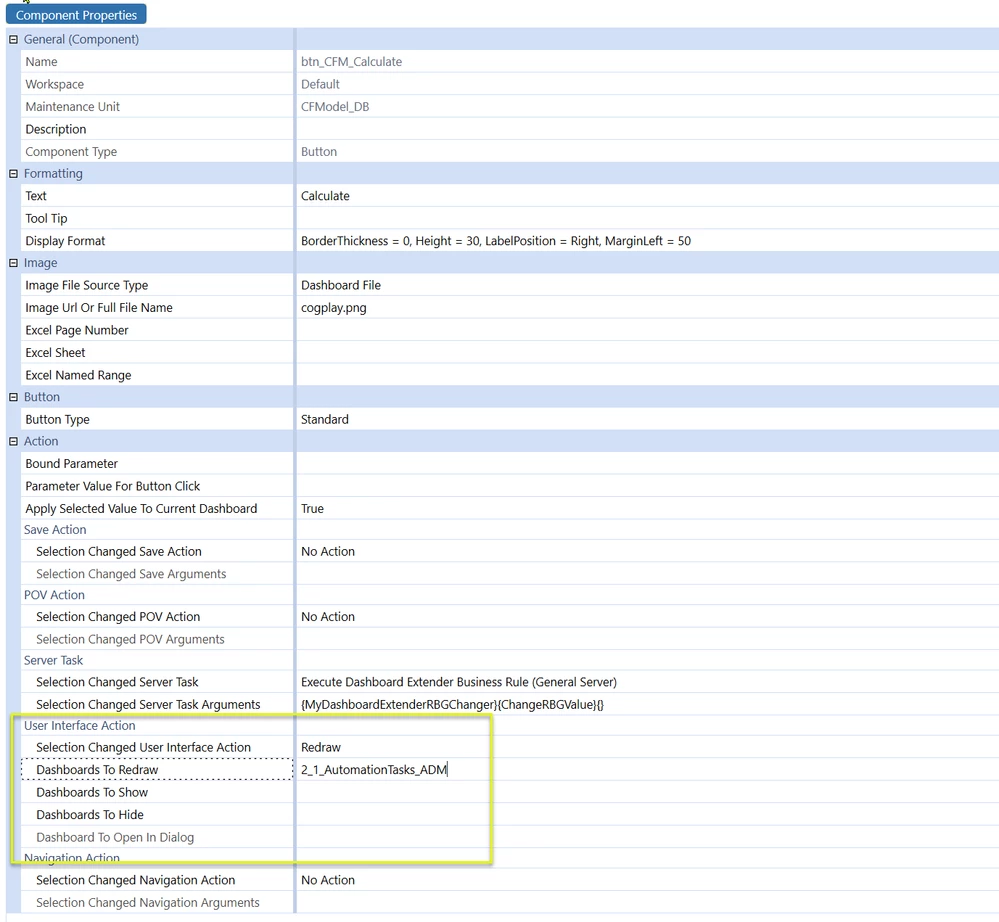
Update the UI using the properties of the control used to call this code:


RobbSalzmann_0-1690832210152.png


1 reply

July 31, 2023

In a DashboardExtender rule you can set the selected radio button in your RBG having values (Calc, Consol, Force) in a parameter called MyRadioButtonGroupParam to consol by:


Dim taskResult As XFSelectionChangedTaskResult = New XFSelectionChangedTaskResult() With {
    .IsOK = True,
    .ShowMessageBox = False,
    .Message = "",
    .ChangeSelectionChangedUIActionInDashboard = False,
    .ChangeSelectionChangedNavigationInDashboard = False,
    .ChangeCustomSubstVarsInDashboard = true,
    .ChangeCustomSubstVarsInLaunchedDashboard = False
}

taskResult.ModifiedCustomSubvars("MyRadioButtonGroupParam") = "Consol"

Return taskResult


This will change the selected radio to the "Consol" item.

Update the UI using the properties of the control used to call this code:


RobbSalzmann_0-1690832210152.png