December 12, 2023
Solved

Verrsion 8.1 Updating Problem
  • December 12, 2023
  • 9 replies
  • 0 views


akshat_0-1702357199901.png

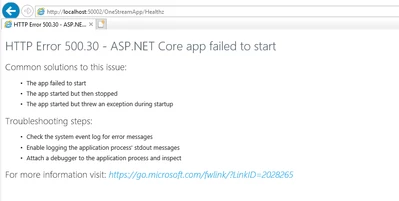
i am getting above error and unable to found any log for this .

 

Best answer by Krishna

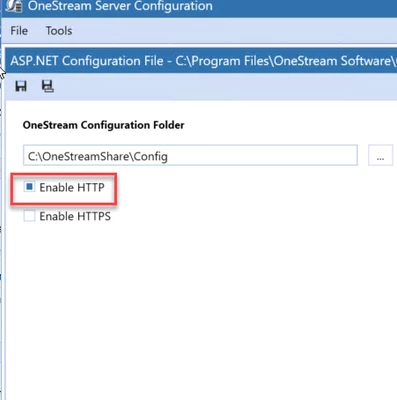
I had the similar issue and it seems I have checked both HTTP & HTTPS. It should be only HTTP if you are not using the HTTPS. Once I have updated and it is working as expected.

Krishna_0-1722276371853.png


9 replies

December 12, 2023

Hello,
It is not really showing a OneStream error. It is an error on the server.
I think the ASP Core was not properly installed. See extract from upgrade guide below (page 14).
Did you install the ASP.NET Core Runtime Hosting Bundle?
https://learn.microsoft.com/en-us/aspnet/core/introduction-to-aspnet-core?view=aspnetcore-8.0

NicolasArgente_0-1702366822101.png

I have also attached the guide.

Cheers

Nic

akshatAuthor
December 12, 2023

We checked the version it is working fine .Please have a look below screen shot.
image001.png

i think Issue is related to Config file which we are storing in share drive we configure via server utility but that is not working.

When we are running web server we are getting below error


error.png
  we checked Health of application its showing healthy for WEB Application

December 12, 2023

Well.. i do not see a file like : dotnet-hosting-6.0.22-win

December 12, 2023


NicolasArgente_0-1702369531044.png


akshatAuthor
December 12, 2023

We already installed ,you can see screenshot that is available in top 1.

December 12, 2023

Then you are correct, the error must be in the ASP.net config file of OneStream.  I presume you already updated the ASP.NET on your server to the correct path : 
-C:\Program Files\OneStream Software\OneStreamAppRoot\OneStreamApp\appsettings.json
-C:\Program Files\OneStream Software\OneStreamWebRoot\OneStreamWeb\appsettings.json
-C:\Program Files\OneStream Software\OneStreamWebApiRoot\OneStreamWebApi\appsettings.json

Did you run the utility as an admin? On my side I only enable HTTP. Check that too.


akshatAuthor
December 12, 2023

yes i run as admin .and apply the server path but my location in e drive 

December 12, 2023

If I were you I would uninstall and reinstall OS - basically redo your upgrade from scratch... You might save time instead of troubleshooting...

January 27, 2024

Found myself in similar situation earlier today. After few hours of frustration,  below steps worked for me...

  • Kill IIS
  • Uninstall OneStream Server
  • Uninstall OneStream Client API
  • Manually delete OneStream Server Folders
  • Install OneStream Server
  • Validate all the configs
  • Reset IIS
July 26, 2024

hiren - Quick Question, could you please let me know the Dot Net Version you installed for this installation and also have you done the below steps?


Krishna_0-1721986877434.png


April 1, 2024

Hi, 

I had this problem when I tried to install v8.2.

So I've been trying to upgrade version 7.3 to 8.2 following the Upgrade Guide, but I have a issue (I think is the same problem) so I would like to know how did you solve it. 


epoveda_ac_0-1711989163714.png


epoveda_ac_1-1711989334285.png


KrishnaAnswer
July 29, 2024

I had the similar issue and it seems I have checked both HTTP & HTTPS. It should be only HTTP if you are not using the HTTPS. Once I have updated and it is working as expected.


Krishna_0-1722276371853.png


May 9, 2024

Suggest you to perform step upgrades 7.3 -> 8.0 -> 8.1 -> 8.2. That's how I upgraded form 7.2 to 8.2.

May 10, 2024

Hi hire, 

It was due to .Net version (were installed one version of 6.X.X and other of 8.X.X). 

I've upgrade to some users their versions from 5.2, 6.2 and 7.3 to 8.2 without issues. 

Nevertheless, thanks for your help! ðŸ˜Š