Platform Release: OneStream v9.3
OneStream is pleased to announce the General Availability of Platform v9.3, which is now available on Solution Exchange.
See Platform End of Support Dates on the OneStream Documentation site.
Features and Benefits
|
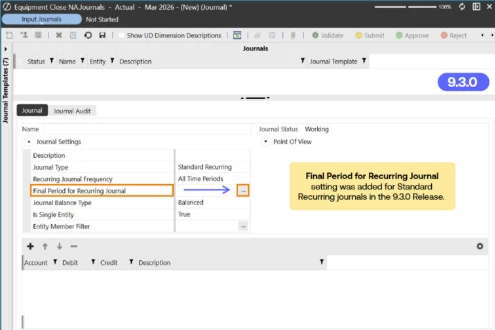
Feature: Final Period for Recurring Journals |
Benefit: This new property allows you to specify an ending period for a journal’s recurrence. Previously, the recurring journal would always generate a next period journal upon posting the current period journal.
Learn more about Recurring Journals.
| Feature: New properties to format Excel Named Range objects embedded to XFDocs |
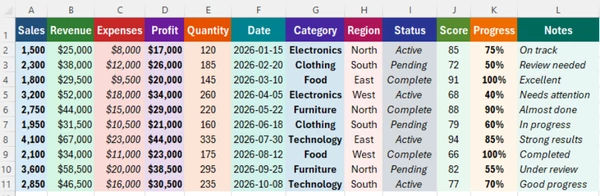
Benefit: Named Ranges are often used to embed Excel data tables or charts into XFDocs for Narrative Reports. Previously, large named ranges were challenging to format into designated report layouts. Now, Fit to Page and Scale properties make embedding large named ranges easier to format.
Large Named Range in Excel:
Named Range embedded into XFDoc:
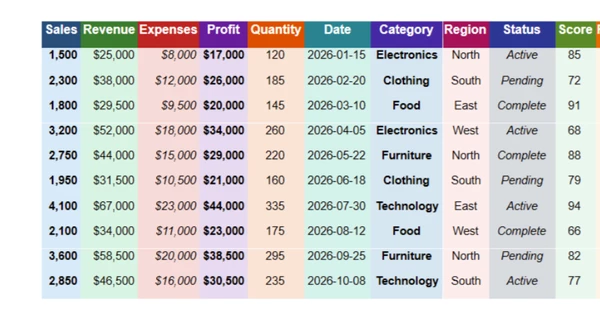
Named Range with Fit to Page = True and Scale = False:
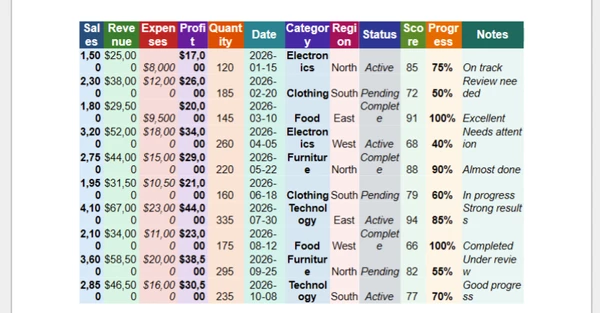
Named Range with Fit to Page = True and Scale = True:
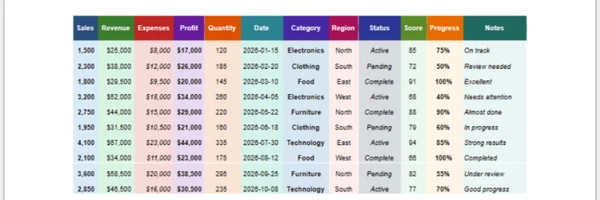
Learn more about embedding Named Ranges into XFDocs.
| Feature: Journal Performance |
Benefit: Load, review, and posting processes are faster for large journals. A page control helps manage predictable rendering of large journals with several hundred or thousands of lines.
| Feature: Browser Cube View and Grid Performance |
Benefit: The component used for rendering Browser Cube Views and Grids has been optimized, resulting in faster rendering times relative to previous releases.
Learn more about recent innovations in the Modern Browser Experience.
Features for Application Builders
| Feature: Categories to organize Maintenance Units |
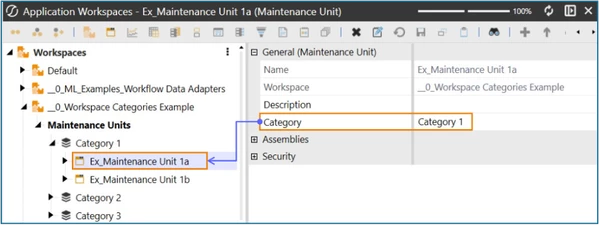
Benefit: The Category property allows Application builders to group Maintenance Units. Organizing Maintenance Units reduces visual clutter and provides for enhanced navigation – especially for Workspaces that contain a large number of Maintenance Units.
Additional Features for Application Builders
- The LabelUnderline property provides enhanced styling for text in the following components:
Button
Check Box
Combo Box
Date Selector
List BoxMember Tree
Password Box
Radio Button Group
State Indicator
Text Box -
The Profile Builder dialog now includes an Group Filter to assist in building Profile permissions. Additionally Groups are preceded by their Workspace affiliation.
Technology Notes
Platform v9.3 is developed with Microsoft’s .NET 10 Development Framework
Platform v9.3 marks a transition from v9.2’s use of .NET 8. All OneStream Platform releases in 2026 and 2027 will use .NET 10. Learn more about OneStream’s use of .NET in its development process and the customer impact in this blog.
| Windows Client | Browser and Excel Add-In | SIC Local Gateway Server |
| User Workstations operating OneStream’s Windows Client require installation of the .NET 10 Desktop Runtime. We recommend the current version, but all .NET 10 versions are compatible. Microsoft .NET Downloads can be found here. | Users operating OneStream’s Browser or Excel Add-In (and not the Windows Client) do not need the .NET Desktop Runtime installed on their Workstation. | The Platform v9.3 Smart Integration Connector (SIC) Local Gateway Server operates on .NET 10 (previous versions operated with .NET 4.8). As a result, the .NET 10 ASP.NET Core Runtime (Hosting Bundle) must be installed to the SIC Local Gateway Server. |
Deprecations
- The Basic Chart will no longer be available as a new dashboard component. The Basic Chart component will continue to function and support edit, copy/paste, and XML file loading until it is deprecated from the OneStream Platform, which is targeted for the second release in 2026.
- WinSCP, most commonly used in Secure File Transfer Protocol (SFTP) data integration processes, has been deprecated and will no longer be included in the Platform and Smart Integration Connector as a natively referenceable DLL. OneStream recommends using SSH.Net for SFTP integrations. Existing customers that use WinSCP and are preparing to upgrade to this release are encouraged to convert their WinSCP processes to use SSH.Net. Additional information on SSH.Net can be found in the Smart Integration Connector Guide.
Fixed Excel Issues
- Offline Copy Retains Formulas: Offline copies retain cell values when XFGetlCell formulas are removed while using Save Offline Copy, no longer resulting in #NAME? or #VALUE.
- Resolved OLE Error during Workbook Refresh and Submit: Large Excel workbooks with many XFGet references will not cause OLE errors during refresh or submit operations. Refresh Workbook processes regardless of workbook size.
- XFGetCell Drill Down with Cell References: Drill down functions for XFGetCell formulas referencing worksheet cells or named ranges in both the Excel Add-In client and Spreadsheet.
Platform Release v9.3 Highlights
To learn even more about Platform Release v9.3, visit our interactive guide below: