
Solution Announcement: OneStream Developer Studio
| OneStream Development Made Easy |
|
A new OneStream client that facilitates:
|
Developer Studio Client
What is Developer Studio?
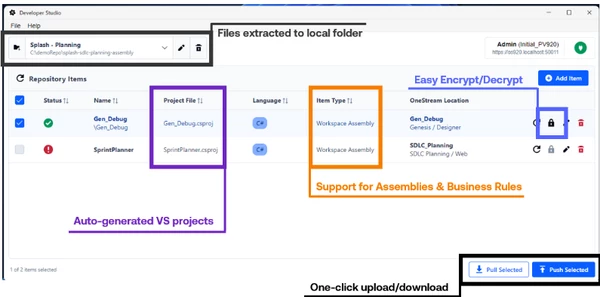
OneStream Developer Studio is a desktop application that lets developers work on OneStream business rules and workspace assemblies locally, in the IDE of their choice, rather than inside the platform's built-in editor. It connects to any PV9.2.0+ OneStream environment, pulls code down as .NET project files, and pushes changes back with server-side compilation and instant build feedback.
Key Features to Highlight
- Connect to OneStream — Authenticate through OneStream Identity Server. Select your server, log in, and choose an application. No additional server configuration required.
- Pull business rules and workspace assemblies — Browse the rules and assemblies you have access to in your application — the same security model you already have in OneStream — select the ones you want, and pull them to your local machine as .NET project files.
- Download OneStream Reference Assemblies — Download the reference assemblies that give your IDE the context it needs for real IntelliSense, Go to Definition, and local compilation.
- Develop in any IDE or editor — Visual Studio, VS Code, Cursor, Rider — whatever you prefer. Once code is local, your full toolchain is available: source control, AI coding assistants, extensions, debugging tools, and everything else.
- Push changes back to OneStream — Push your updated code back to the platform. OneStream compiles it server-side and returns immediate feedback — errors, warnings, or a clean build confirmation.
- Encrypt and decrypt — Encrypt or decrypt business rules and assemblies directly within Developer Studio.
- Multiple local repositories — Organize your work across multiple repositories backed by folders on your local machine.
- Dark mode — Includes a dark mode option.
Scope: What Developer Studio Supports
Developer Studio works with business rules and workspace assemblies. These are the core code artifacts that developers build on OneStream.
It does not currently support other OneStream content types such as dashboards, cube views, member filters, member formulas, data management sequences, or other platform configuration. The scope is specifically focused on the code development workflow.
Scope: What Developer Studio Is Not
- Developer Studio is not a source control tool. It does not track changes, manage branches, or handle merges. What it does is enable you to develop locally, where you can use Git, Azure DevOps, or any source control tool you already know. Developer Studio gets your code onto your machine; what you do with it from there is up to you and your team's workflow.
- Developer Studio is not an IDE or code editor. It does not have a built-in editor. It is the bridge between OneStream and your local development environment. You bring your own editor.
- Developer Studio does not have AI built in. It does not generate code, offer suggestions, or include any AI features. However, by enabling local development, it unlocks the ability to use AI-powered tools like Cursor, GitHub Copilot, or any other AI assistant that works in your editor.
- Developer Studio does not replace the built-in OneStream editor. It is a complement. The platform's built-in editor is not going away. Developer Studio is an alternative for developers who want a more powerful, modern workflow — but you can use whichever approach fits your needs.
FAQs
Q. What content types does it support?
A. Business rules and workspace assemblies.
Q. Do I need to change anything on my OneStream server?
A. No. Developer Studio connects through Identity Server using your existing credentials and configuration.
Q. Can my team use it at the same time?
A. Yes. Each developer connects independently, pulls code to their own machine, and pushes changes back. Combined with Git or another source control tool, teams can collaborate using standard branching and merge workflows.
Q. Is it a replacement for the built-in editor?
A. No. It's a complement. Use whichever workflow fits your needs.
Q. Does it include source control?
A. No. Developer Studio enables local development, which means you can use any source control tool (Git, Azure DevOps, etc.) with your code. It doesn't manage version control itself.
Q. Does it include AI?
A. No. But because your code is local, you can use any AI-powered editor or assistant — Cursor, GitHub Copilot, etc. Developer Studio makes that possible by getting your code out of the platform.
Q. What version of OneStream do I need?
A. PV9.2.0 or later.
Q. Where can I get it?
A. Developer Studio is available on the OneStream Solution Exchange.