July 25, 2023

Advanced Charts Crosshair Text Format

  • July 25, 2023
  • 2 replies
  • 0 views

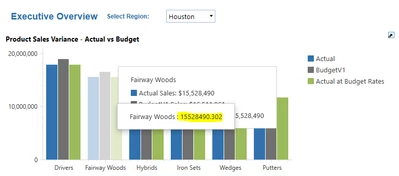
Does anyone know how to remove the highlighted crosshair label?  When adding crosshairs to advanced charts, the legend pops up, however, an additional field pops up that is not formatted accordingly.

Clinkscake_0-1690314246744.png


2 replies

July 26, 2023

Hi Clinkscake The V is for the Value and number format you want to display.  You can disable Crosshairs by setting it to False.


MikeG_0-1690373703559.png


MikeG_1-1690373830595.png


You can get lost with all the options and settings, it's more of an art than a science.  You should be able to disable crosshairs completely, or at least make it look the way you want, or make it cleaner.  

In my example S - Legend, A - Argument (X-Axis) - V - Amount

{S} - {A} - {V:$#,###}

Hope this helps,

Mike


September 13, 2023

How do you remove the second pop up that is highlighted? I have been having the same issue on my dashboard as well.

September 21, 2023

I submitted a ticket with OneStream- they said it is a known bug and they are currently working on fixing it.

July 27, 2023

I like having the crosshair legend, but it's the second legend pop-up that I don't like. The one in the back is formatted similar to what you have described: {S}: ${V:###,###}.  However, this formatting doesn't seem to apply to the second pop-up.  Do you know how to reformat the second pop-up?