December 10, 2025
Solved

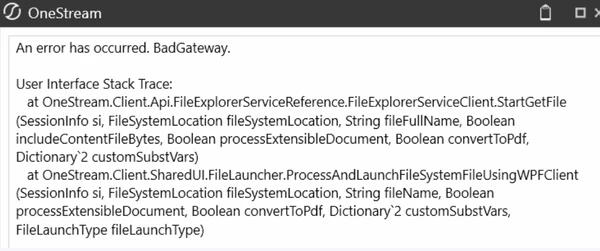
An Error Has Occured BadGateway - Books

  • December 10, 2025
  • 4 replies
  • 5 views

Hello, 

When i am running Books from File Explorer -  Application Database, I am getting the below error, did any one come across this issue. requesting to help me how to handle this issue and get output. 


Best answer by sameburn

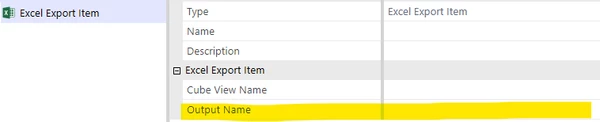
For clarity, I am referring to the output file name (the name of the file output - see example below for excel), not the looping variable. 

I suspect the book may be trying to create a file that either (a) already exists or (b) is already open.,  This is why I suggested changing the file name output to see if that resolved


4 replies

December 10, 2025

Hi ShivaPrasad​ 

I think this might be a bug on v9.  I would recommend reaching out to Support to help you resolve.

If you are not on version 9, then it could be something wrong with the target filepath e.g si.UserName result is "user name" but target folder is "username",  etc

Hope this helps

Sam

December 12, 2025

Hello Sam, 

actually i have created the Books in version 9.1, interesting thing is out of  many  book's only 2 books are not working. the configuration and other settings from source cube view is same.  


Regards,

Shiva.

December 14, 2025

Since yours seems to work (in some cases). I suspect you are not hitting this bug.

If you change the file name output (to something new) from the books that are not working, does it resolve?

December 15, 2025

Hi Sam,

As suggested,  below are the different output names that i have tried. but still we are getting "GateWay" error for two reports. (In these two books we are passing Loop1 as customers and Loop2 as Entity)

 |Loop1Variable|
|Loop1DisplayVariable|
|Loop1Index|.


sameburnAnswer
December 15, 2025

For clarity, I am referring to the output file name (the name of the file output - see example below for excel), not the looping variable. 

I suspect the book may be trying to create a file that either (a) already exists or (b) is already open.,  This is why I suggested changing the file name output to see if that resolved
