
November 13, 2024
Solved

Attribute Dimension | Vary by Time & Scenario Type

  • November 13, 2024
  • 1 reply
  • 0 views

Is it possible to make an attribute member run a comparison based on the stored text attribute for a specific Time Period ?

Ex: - Text8 & 2023M1 =>  FO_SUPM
      - Text8 & 2023M6 => FO_HYPM

Based on the cell pov, is it possible to make the attribute member adapt to the context's Time Period instead of picking the stored Default Value for the Text 8 ?
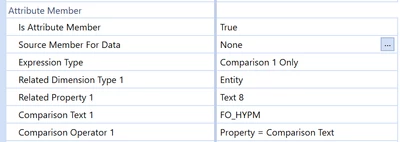

Keyser_Soze_0-1731505581287.png


Thanks. 

Best answer by T_Kress

Attribute members do adhere to time and scenario dependencies.  One word of caution though is if a text property changes mid-year, the YTD data will be shown under the new text property after the YYYYMM in which the text changes.  By this I mean the following:

If it is FO_SUPM in M1 and then becomes FO_HYPM in M6, the data will show periodic and YTD as FO_SUPM through M5, but the full YTD amount will then show as FO_HYPM from M6 on.

1 reply

T_KressAnswer
November 18, 2024

Attribute members do adhere to time and scenario dependencies.  One word of caution though is if a text property changes mid-year, the YTD data will be shown under the new text property after the YYYYMM in which the text changes.  By this I mean the following:

If it is FO_SUPM in M1 and then becomes FO_HYPM in M6, the data will show periodic and YTD as FO_SUPM through M5, but the full YTD amount will then show as FO_HYPM from M6 on.