Solved
Audit history of form data before the change
Greetings -
Looking for Audit option to track the data before the change, 'Audit History For Forms' option shows data after the change.
Thanks!

Greetings -
Looking for Audit option to track the data before the change, 'Audit History For Forms' option shows data after the change.
Thanks!
JackLacava Thanks for the table info. Unfortunately, for me these reports are not generating any data and Time is being displayed as weeks (2nd screen shot).
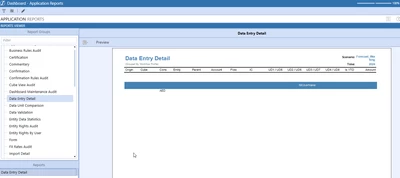
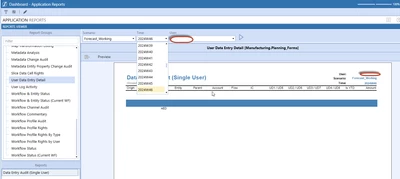
That's normal, it's because you have a weekly application.
If you're entering data at monthly level for a particular scenario, unfortunately this report won't work out of the box, you'll have to build your own.
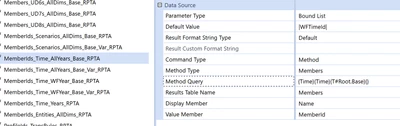
If you want to start from the existing one, you can copy the dashboard grp_PR_DataEntry_UserDetails and all its linked components - including Parameters bound to the comboboxes, i.e. MemberIds_Scenarios_AllDims_Base_RPTA, MemberIds_Time_AllYears_Base_RPTA, UserIDs_RPTA - to a new Workspace, then modify the filter that the relevant Parameter is currently using, which as you can see is pointing to base members (the Method Query property):
Enter your E-mail address. We'll send you an e-mail with instructions to reset your password.