
November 29, 2024

Basic Question about BI Viewer and Cube View MD data source Column Expression

  • November 29, 2024
  • 5 replies
  • 1 view

I have a Cube View with three Account dimension columns - Net_Rev, Std_Cost, and a CVC calculated division column to calculate Std_Margin (Std_Cost/Net_Rev). Rows are a UD dimension representing the Product.  In my Dashboard, I have a Cube View MD Data Adapter using this Cube View as the data. 

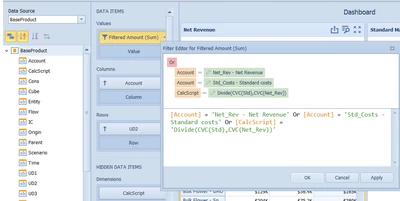
When I add a BI Viewer Pivot Grid, I want to display the same three columns - Net_Rev, Std_Cost, and the calculated column. I see CalcScript in the Pivot Grid's Data Source dimensions. How do I use it in the Pivot Grid to display the calculation that the Cube View was doing for that third column?

I thought I might reference it in the Value filter along with the two Accounts, but it doesn't appear as a column in the Pivot Grid.

KurtMayer_0-1732919894959.png


5 replies

December 2, 2024

One solve may be to make your 3rd CV column a dynamic U8 calc that you can pull into your CV versus CV math.  Then that 3rd column may pull through correctly to BI viewer without having to re-write the calc in BI viewer.  Maybe a round about solve.

December 3, 2024

You may also want to try using the Account filters in the getdatacell in the cube view instead of CVC math, if possible. I'm curious to see if that would make a difference. When you run just the data adapter, do the values come in for the calculated column?

December 3, 2024

KurtMayer  - we can use CalcScript as column and it will show the calculated value as 3rd Column, the column header will show the formula

December 9, 2024

When working with a Pivot Grid and you want to replicate a calculation that was previously done in a Cube View via a calculated column or CalcScript, you can leverage the Pivot Grid’s built-in calculations. In your Pivot Grid properties, go to Values > Calculation, choose a calculation type like Percentage of Difference, then select Custom.

From there, you can enter a custom expression such as: ToDouble(Sum([Amount]) / Lookup(Sum([Amount]), -1)) 

This particular example divides the current column’s total by the previous column’s total (using -1 to reference the previous column), effectively mimicking the ratio or margin calculation you had in the Cube View’s CVC column. Of course, you’ll need to adjust the expression based on your exact scenario and which measures you’re comparing.

December 12, 2024

KurtMayer if one of these suggestions helped solve your question, please can I ask that you mark it as the solution. Thanks