
book with PPT file donot run
hi team, I hope you are well.
I'm creating a book with Word and PowerPoint files but the Powerpoint shows an error and the parameters are the same in both files:
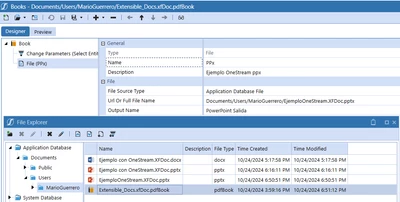
If I select the file on OnePlace is running opening PowerPoint application.
here is the error:
Value cannot be null. (Parameter 'buffer').
User Interface Stack Trace:
at System.ServiceModel.Channels.ServiceChannel.HandleReply(ProxyOperationRuntime operation, ProxyRpc& rpc)
at System.ServiceModel.Channels.ServiceChannel.Call(String action, Boolean oneway, ProxyOperationRuntime operation, Object[] ins, Object[] outs, TimeSpan timeout)
at System.ServiceModel.Channels.ServiceChannelProxy.Invoke(MethodInfo targetMethod, Object[] args)
at generatedProxy_6.StartGetFile(SessionInfo, FileSystemLocation, String, Boolean, Boolean, Boolean, Dictionary`2)
at OneStream.Client.Api.Wcf.FileExplorerServiceReference.FileExplorerServiceClient.StartGetFile(SessionInfo si, FileSystemLocation fileSystemLocation, String fileFullName, Boolean includeContentFileBytes, Boolean processExtensibleDocument, Boolean convertToPdf, Dictionary`2 customSubstVars)
at OneStream.Client.SharedUI.FileLauncher.ProcessAndLaunchFileSystemFileUsingWPFClient(SessionInfo si, FileSystemLocation fileSystemLocation, String fileName, Boolean processExtensibleDocument, Boolean convertToPdf, Dictionary`2 customSubstVars, FileLaunchType fileLaunchType)
Do I need some different for pptx file?
Thanks in advance and Best regards.
Mario G