
December 12, 2024

Can you use Parameters with the Excel Add-in or in Spreadsheet

  • December 12, 2024
  • 4 replies
  • 1 view

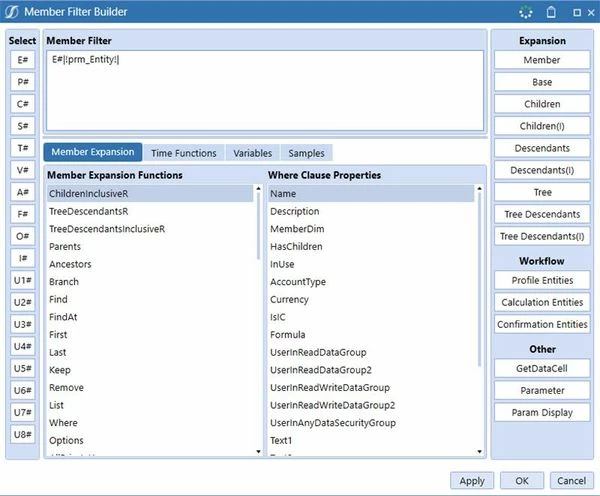
I am trying to build a quick view where the Member Filter refers to a parameter but E#|!prm_Entity!| produces this error in Excel: #ERROR - The member filter contains unresolved parameters.


4 replies

December 13, 2024

Hi Gert,

To my knowledge, Quick Views require the member name. However, if you prefer working in Excel, you can import a Cube View into the worksheet that includes that parameter. While it's not as flexible as a Quick View for ad hoc analysis, the Cube View within the worksheet allows for the use of dynamic parameters.

Gert_VCCAuthor
December 13, 2024

Hi Ioana, Thanks for the suggestion. Will that cube view still be restricted to max 12 dimensions? I need to see 16 out of the 18. 

December 13, 2024

I would suggest using the FdxExecuteCubeView method where you build your Cube View, define all dimensions, and then create a data adapter - type method - where you call the FDX, so you will get extract the CV information in the layout you need, and you can also pass parameter values in there. I do not think the Cube View will get you to the desired display. Also, if you need  to extract large datasets, this method is performance oriented.

Here is a good example of using FDX to extract CV data, and you can adapt it to your case: FDX Cube View Rule | OneStream Community

Thanks.

Gert_VCCAuthor
December 13, 2024

Meant to reply to the post from Ioana not the original post. 

Gert_VCCAuthor
January 7, 2025

In the end I created a Dashboard Data Set Business Rule to execute a sql query and return a data table with base data as per parameters set in a dashboard. 

May 16, 2025

Hello Gert,

QuickView can not read parameters, but QuickView can read XFBR.

So you can not pass the parameters into XFBR bt you can call XFBR without passing the parameters.

XFBR(Workspace.VCG_STP_Blend.VCG_STP_Blend.ParamHelper, GetSelectedEntity)

But that one does not work

XFBR(Workspace.VCG_STP_Blend.VCG_STP_Blend.ParamHelper, GetSelectedEntity, SelectedEntity=|!cv_SelectedEntity!|)