July 18, 2024
Solved

cell format in CV using parameter

  • July 18, 2024
  • 1 reply
  • 1 view

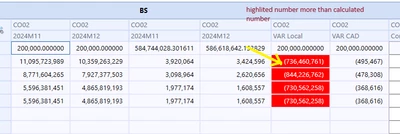
hi Team; I've a cube view showing accounts than need to highligh in red when overlap a number dependig the FxRate, I created an Finance BRule searching for a specific rate and multiply be a number where is more than this is highlighted in red. My problem is that number is recorded in a paramenter but is not working, maybe in the image below is showing better than my explanation; could sombody knows how is the parameter format?
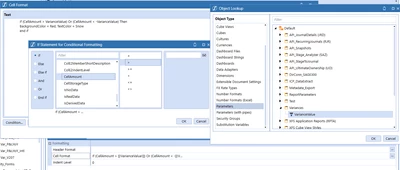
MarioGV_1-1721333159150.png


MarioGV_0-1721332847739.png

Thank you and best Regards

Mario G

Best answer by MarioGV

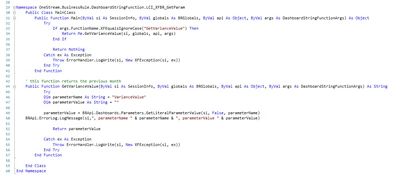
I created an XFBR using the funcion GetLiteralParamenterValue and the way to call the function in a cube view is:

If (CellAmount > XFBR(LCI_XFBR_GetParam, GetVarianceValue)) or (CellAmount < -XFBR(LCI_XFBR_GetParam, GetVarianceValue)) Then
    BackgroundColor = Red, TextColor = Snow
end if

and the XFBR is simple:


MarioGV_0-1721687810095.png

thank you for your help and I hope could be useful for somebody else.

Regards

Mario G

1 reply

July 19, 2024

I am not sure but can u try writing a XFBR and use the function (Parameter should be a literal parameter value)

Return BRApi.Dashboards.Parameters.GetLiteralParameterValue(si,False,Guid.Empty,"Default.prm_Name") and the call the same in the CV
Not sure it will work but can u give it a shot.

(I hope u have tried using hardocoding and u are getting the expected formatting due to that)

MarioGVAuthorAnswer
July 22, 2024

I created an XFBR using the funcion GetLiteralParamenterValue and the way to call the function in a cube view is:

If (CellAmount > XFBR(LCI_XFBR_GetParam, GetVarianceValue)) or (CellAmount < -XFBR(LCI_XFBR_GetParam, GetVarianceValue)) Then
    BackgroundColor = Red, TextColor = Snow
end if

and the XFBR is simple:


MarioGV_0-1721687810095.png

thank you for your help and I hope could be useful for somebody else.

Regards

Mario G