
October 8, 2024
Solved

Change display name on view member

  • October 8, 2024
  • 1 reply
  • 0 views

Hey all,

So i'm trying to solve the display name of a view member in a cubeview column.

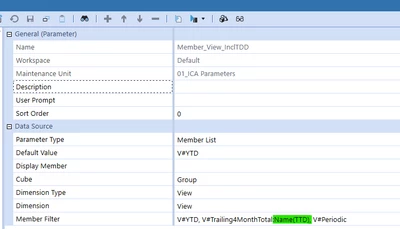
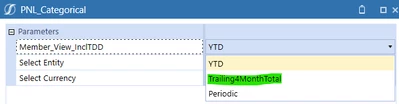
I manage to change the display name by using Delimited List by changeing display name in parameter dropdown to "TTD" in this case.

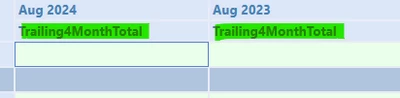
However the membername in the cubeview column is still the original membername in the dimension (Trailing4Months).

I tried Member List as shown on prontscreen below. I did also try the condition rules in the cubeview but did not find any returning input of display name.

I think I could solve this with XFBR but wanted to check here first to see if there are any "Built in" solution to handle this? Thanks in advance
param1.png


param2.png


param3.png


Best answer by KarlT

It'll depend where you're putting the parameter. If in the CV POV then just remove the V# from the parameter Values. If in the rows and columns you will need to either include the V# in the parameter or in the member filter directly


if you're putting it in the CV POV though i dont think the Name part will work anyway. You'll need to put this in the columns for that.

1 reply

October 8, 2024

You could try a delimited parameter something like this:


KarlT_0-1728378878601.png


JonesAuthor
October 8, 2024

Hey, thanks for quick response.

I did try something simlar and it's not working for the cubeview. It works for the param dropdown however.

The cubeview dosen't like the "V#" from the delimited list. That's why I ended up trying the Member list (That diden't work as I hoped either) 😞


Jones_1-1728379189173.png


Jones_3-1728379217835.png


Jones_0-1728379168959.png

The cubeview ends up empty like this:


Jones_4-1728379239889.png

October 8, 2024

It'll depend where you're putting the parameter. If in the CV POV then just remove the V# from the parameter Values. If in the rows and columns you will need to either include the V# in the parameter or in the member filter directly