
November 6, 2024
Solved

Conditional Statement in the Cube View Columns

  • November 6, 2024
  • 2 replies
  • 0 views

Hey All,

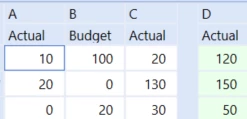
We got a recent requirement of implementing a conditional statement inside the cube view columns. The user wants to calculate a certain column on the basis of the value of another column. The design is explained below:

If B <> 0 then

D= B+C

else if B = 0 then

D= A+C

ABCD
1010020120 (100+20)
200130150 (20+130)
0203050 (20+30)

I'm currently facing difficulty to implement this solution inside the cube view. My first shot was trying something in the XFBR string but that I couldn't get around the logic to implement the same.

Any leads will be appreciated.


Thanks!

Pragyanshu Bansal
JackLacava OSAdmin 

Best answer by EdwinS

Hi Bansal, 

You can try using the custom function in finance business rules, you can Add the function in the cube view using GetDataCell, like: (BR#[BRName=YourFinBusinessRule, FunctionName=CalculateD, A=S#Actual,B=S#Budget, C=T#2023M12]):Name(D)

In the finance business rule you can add the below code segment:

Select Case api.FunctionType
				Case Is = FinanceFunctionType.DataCell
					If args.DataCellArgs.FunctionName.XFEqualsIgnoreCase("CalculateD") Then
						Dim colA As String = args.DataCellArgs.NameValuePairs.XFGetValue("A")
						Dim colB As String = args.DataCellArgs.NameValuePairs.XFGetValue("B")
						Dim colC As String = args.DataCellArgs.NameValuePairs.XFGetValue("C")
						Dim A As Decimal = api.Data.GetDataCell($"{colA}").CellAmount
						Dim B As Decimal = api.Data.GetDataCell($"{colB}").CellAmount
						Dim C As Decimal = api.Data.GetDataCell($"{colC}").CellAmount
						If Not B = 0 Then
							Return B + C
						Else 
							Return A + C
						End If
					End If
				End Select

I tested this and it worked. You can expand on the suggestion to meet your needs.


EdwinS_0-1730901151624.png


2 replies

EdwinSAnswer
November 6, 2024

Hi Bansal, 

You can try using the custom function in finance business rules, you can Add the function in the cube view using GetDataCell, like: (BR#[BRName=YourFinBusinessRule, FunctionName=CalculateD, A=S#Actual,B=S#Budget, C=T#2023M12]):Name(D)

In the finance business rule you can add the below code segment:

Select Case api.FunctionType
				Case Is = FinanceFunctionType.DataCell
					If args.DataCellArgs.FunctionName.XFEqualsIgnoreCase("CalculateD") Then
						Dim colA As String = args.DataCellArgs.NameValuePairs.XFGetValue("A")
						Dim colB As String = args.DataCellArgs.NameValuePairs.XFGetValue("B")
						Dim colC As String = args.DataCellArgs.NameValuePairs.XFGetValue("C")
						Dim A As Decimal = api.Data.GetDataCell($"{colA}").CellAmount
						Dim B As Decimal = api.Data.GetDataCell($"{colB}").CellAmount
						Dim C As Decimal = api.Data.GetDataCell($"{colC}").CellAmount
						If Not B = 0 Then
							Return B + C
						Else 
							Return A + C
						End If
					End If
				End Select

I tested this and it worked. You can expand on the suggestion to meet your needs.


EdwinS_0-1730901151624.png


Bansal_PAuthor
November 6, 2024

This works like a charm. Thanks a lot! Edwin