
October 16, 2024
Solved

Conditional Visibility of Button Based on ComboBox Selection

  • October 16, 2024
  • 1 reply
  • 0 views

Hi,

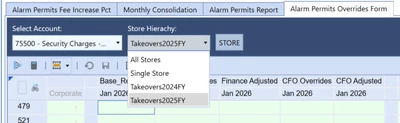
I need help implementing conditional visibility for a button in my dashboard. In the attached image, there's a Store button that I'd like to make visible only when the "Single Store" option is selected in the Store Hierarchy combo box. When any other option (e.g., "All Stores," "Takeovers2024FY," etc.) is selected, the button should either disappear or have a different style to appear disabled.

Can anyone guide me on how to achieve this behavior?

Thanks in advance!

AlexaRamirezPam_0-1729116526125.png


Best answer by KarlT

Hi, I think you could create an XFBR that checks the parameter value and returns a True or False depending on the selection value. The Store button could then have "IsVisible = XFBR(insertXFBRdetail)" in the display format. Lastly, you would need to make sure the dashboard containing the button is refreshed whenever the store hierarchy dashboard is changed. You can use the standard "User Interface Actions" on the combo box for this.

1 reply

KarlTAnswer
October 17, 2024

Hi, I think you could create an XFBR that checks the parameter value and returns a True or False depending on the selection value. The Store button could then have "IsVisible = XFBR(insertXFBRdetail)" in the display format. Lastly, you would need to make sure the dashboard containing the button is refreshed whenever the store hierarchy dashboard is changed. You can use the standard "User Interface Actions" on the combo box for this.

October 21, 2024

Thank you!!