October 16, 2024
Solved

Create Parameters for Member Filters...where to start?

  • October 16, 2024
  • 4 replies
  • 2 views

Hi, I am creating a report for our auditors that takes the IC accounts and their elimination "Plug" account throughout the Origin dimension. I don't want to create a bunch of separate reports for AP/AR, Sales/COGS, IC Expense, etc. My thought is to define these in a Parameter and then build a book. Can anyone point me to a good starting point on how to define these 4 different drop down options? For example, the AP/AR one would include A#19999, A#29999, and A#IC_DIFF, and the report user would select AP_AR_DIFF or something like that.

Any insight is appreciated - the forum has been very helpful! Thank you!
Best answer by T_Kress

I am sure there are many ways to tackle this.  One approach would be to use a text property on the accounts to tag the accounts you want grouped together, with the same text field.

for example, tag your IC A/R accounts (including related plug) with Text1 = ICAR, tag your IC A/P accounts (including its related plug) with Text1 = ICAP, and so on.

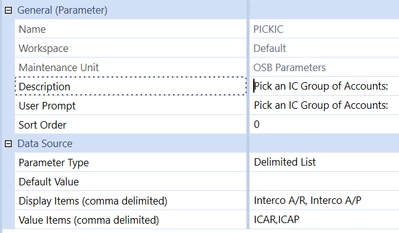
Then in your parameter set up a delimited list such as this, again just an example:


T_Kress_0-1729174772838.png

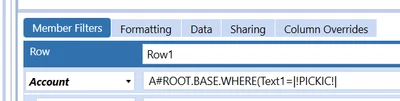
Then in your cube view use that parameter in a Where clause like this:


T_Kress_1-1729174853339.png

When the user runs the cube view they will be prompted to select which group of intercompany accounts they want to see. Once they select, that is used in the WHERE clause on the cube view to pull back only those accounts.

Again, this is one approach.  I am sure there are many other approaches.

4 replies

October 16, 2024

If you are just trying to create sets of different parameters, you create parameters here:


T_Kress_3-1729117741738.png

You can create a literal parameter with a list of accounts.


m_b_b_15Author
October 17, 2024

Thanks Teresa - how would I go about creating a custom group so that would be reflected in the drop down? For example, I want IC Receivable, IC Payable, and IC_Plug in each of the rows and the user would just select "AP_AR_Elim" and see these 3 accounts eliminating throughout the hierarchy.  I don't want to run it for each account separately.

T_KressAnswer
October 17, 2024

I am sure there are many ways to tackle this.  One approach would be to use a text property on the accounts to tag the accounts you want grouped together, with the same text field.

for example, tag your IC A/R accounts (including related plug) with Text1 = ICAR, tag your IC A/P accounts (including its related plug) with Text1 = ICAP, and so on.

Then in your parameter set up a delimited list such as this, again just an example:


T_Kress_0-1729174772838.png

Then in your cube view use that parameter in a Where clause like this:


T_Kress_1-1729174853339.png

When the user runs the cube view they will be prompted to select which group of intercompany accounts they want to see. Once they select, that is used in the WHERE clause on the cube view to pull back only those accounts.

Again, this is one approach.  I am sure there are many other approaches.

m_b_b_15Author
October 17, 2024

Thank you! I tagged the accounts with their associated elimination using the Text Field. So, Interco AP was tagged with IC_PLUG in Text Field 2. Then, I created the parameter using the Member List as suggested above, and used the 4 elimination accounts to view called |!Select_Elim_Group!|. This achieves what I am looking for  in the cubeview.