October 9, 2024
Solved

Cube view add dimensions to columns

  • October 9, 2024
  • 2 replies
  • 0 views

hi all, I hope you are doing well.

I've a cube view with 2 columns and need to add another dimension, is his a bug to have only 2 dimensions?
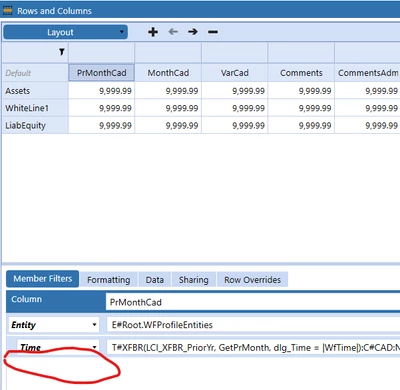

MarioGV_0-1728489643985.png

Thanks in advance. Regards

Mario Guerrero

Best answer by T_Kress

This is not a bug.  Columns only allow for 2 dimension expansions.  You can put more dimensions in each of those two expansions using ":" but you will not be able to expand on more than 2 dims.  If you need more, a Quick View may be an option.

2 replies

T_KressAnswer
October 9, 2024

This is not a bug.  Columns only allow for 2 dimension expansions.  You can put more dimensions in each of those two expansions using ":" but you will not be able to expand on more than 2 dims.  If you need more, a Quick View may be an option.

MarioGVAuthor
October 9, 2024

thank you Teresa, I'm using ":" but would like to have another dimension instead of using :

Kind Regards.

October 10, 2024

Hi, just in case you are asking for it in order to get more column headers in the cube view, this can be achieved by setting the "Use Default Column Headers" to False and then select up to 6 dimensions to be displayed in the column headers.

E.g.:


Henning_0-1728552448797.png


MarioGVAuthor
October 10, 2024

hi Henning; I changed the properties as your image but still having 2 dimension in columns on Designer or Advanced tab.

Could you please send me an image where it was availabe?

Best Regards.

Mario