August 17, 2023
Solved

Cube View Cell Formatting / Division to 1000

  • August 17, 2023
  • 5 replies
  • 0 views

Hi dear contributors / members,

I am trying to format the Cube View cells to final value divided by 1000. Any idea how to do this?

Thanks in advance.

Kind regards,

Irina

Best answer by cjohnson

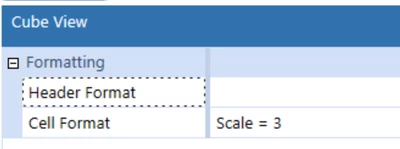
The easiest way would be to set the Cell Format Scale = 3.
cjohnson_0-1692280370084.png


5 replies

August 17, 2023

Set Scale = 3 in formatting:

RobbSalzmann_0-1692280393318.png


cjohnsonAnswer
August 17, 2023

The easiest way would be to set the Cell Format Scale = 3.

cjohnson_0-1692280370084.png


August 18, 2023

Thank you very much both. this helped.

August 18, 2023

I have a further issue now. The division to 1000 works only for the first column. I have shared columns and rows. I have setup Scale = 3 for all rows and all columns, however the divided value appears only for the first column. Any suggestions please?

August 21, 2023

Hi,

We use a UD8 dimension line and call if FmtTho, this is set as a dynamic calc. So in a cube view just have your UD8 set to FmtTho and it will then show the values formatted that way, it does however, keep the precision of the underlying numbers. So 1850253.46 would display as 1850,but if you performed any calculations on the cell it would be based on the 1850253.46 and not 1850.

Does that help ?

Here is the code :

'Code to create a Thousands format

Dim objviewMember As ViewMember = ViewMember.GetItem(api.Pov.View.MemberPk.MemberId)
Dim objaccountid As Integer = api.Pov.Account.MemberId
Dim objAccountType As AccountType = api.Account.GetAccountType(objaccountid)
Dim objTimeDimPk As DimPk = BRApi.Finance.Dim.GetDimPk(si, "Time")


If objViewMember.IsAnnotationType = False Then
If api.Members.HasChildren(objTimeDimPk, api.Pov.Time.MemberID) And api.Data.GetDataCell("U8#None").CellStatus.IsRealOrDerivedData = True And objAccountType <> AccountType.Flow And objAccountType <> AccountType.Balance And objAccountType <> AccountType.DynamicCalc And objAccountType <> AccountType.BalanceRecurring Then
Return api.Data.GetDataCell("(U8#None) /1000").CellAmount
Else

Dim currTime As String = api.Pov.Time.Name
Dim currTimeID As Integer = api.Pov.Time.MemberId
Dim currPeriod As Integer = api.Time.GetPeriodNumFromId(currTimeID)
Dim currYear As Integer = api.Time.GetYearFromId(currTimeID)
Dim globalTime As String = BRApi.Workflow.General.GetGlobalTime(si)
Dim globalTimeID As Integer = api.Time.GetIdFromName(globalTime)
Dim globalPeriod As Integer = api.Time.GetPeriodNumFromId(globalTimeID)
Dim globalYear As Integer = api.Time.GetYearFromId(globalTimeID)
If currYear = globalYear And currPeriod > globalPeriod Then
If api.Data.GetDataCell("U8#None").CellStatus.IsDerivedData = False Then

If api.Data.GetDataCell("U8#None").CellStatus.IsNoData = False Then
If (objAccountType <> AccountType.Flow And objAccountType <> AccountType.Balance And objAccountType <> AccountType.DynamicCalc And objAccountType <> AccountType.BalanceRecurring) Then
Return api.Data.GetDataCell("(U8#None) /1000").CellAmount
Else
Return api.Data.GetDataCell("U8#None")
End If

Else
Return Nothing
End If
End If
Else
If api.Data.GetDataCell("U8#None").CellStatus.IsNoData = False Then

If (objAccountType <> AccountType.Flow And objAccountType <> AccountType.Balance And objAccountType <> AccountType.DynamicCalc And objAccountType <> AccountType.BalanceRecurring) Then
Return api.Data.GetDataCell("(U8#None) /1000").CellAmount
Else
Return api.Data.GetDataCell("U8#None")
End If
Else
Return Nothing
End If
End If
End If
Else
Return Nothing
End If

August 21, 2023

Thank you very much. Will give that a try.