April 29, 2024
Solved

Cube View - Column and Row Index

  • April 29, 2024
  • 3 replies
  • 5 views

Is it possible to use a variable or dynamic selection on the the index?  For example, I would like it to vary based on the cubeview time, e.g. - an index of 1:(SubPeriodNum).

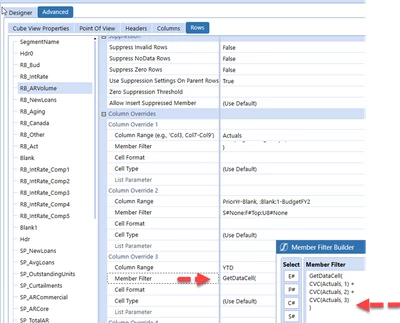
See example below.

CAIGuySeanF_0-1714401006567.png

Best answer by Krishna

Do you have some sample syntax that I could leverage?


CAIGuySeanF  -

1. You have to create Dashboard XFBR String Rule under Business Rules.

2. Call the XFBR in your CV Col Ex XFBR(BRName,FunctionName, Param1 = Value1) Based on the below Code

XFBR(YourRuleName,YearParamRpt9,ParamYear=|!YourParam!|)

Hope this helps. 

				
				'Function Name
				If args.FunctionName.XFEqualsIgnoreCase("YearParamRpt9") Then
                'Get the Parameter from Cube     
                Dim Pov As String = args.NameValuePairs("ParamYear")

                
                'Mon            
					If FinalMon = "2024M3" Then
                
						Return "GetDataCell(CVC(Actuals, 1)+CVC(Actuals, 2)+CVC(Actuals, 3))"
		
					End If
				End If


3 replies

April 29, 2024

CAIGuySeanF  - Based on the Example in the Member filter builder it should work.


Krishna_0-1714404586878.png


April 29, 2024

Hey Krishna, I'm currently using that logic but want to make it dynamic.  My index needs to change each month as the column is AllPriorInYearInclusive.

For March, I needed the member filter to be..

GetDataCell(
CVC(Actuals, 1)+
CVC(Actuals, 2)+
CVC(Actuals, 3)
)

For April, I don't want to go back into the cubeview to add the 4th index.  I want to be able to automate it to pull all the values or base it off a parameter.


April 29, 2024

CAIGuySeanF  - Got it. You can use the XFBR for this based on the Time Period Filter it should return the GetDataCell formula. so you do not need to change every month.

April 29, 2024

CubeViews aren't Excel; in most cases, it makes more sense to try and reason in terms of member expansions rather than in terms of cells.

For example, what you want can likely be obtained by having a "MyCol" column defined as:
S#Actuals:T#|CVTime|.AllPriorInYearInclusive
(you can set its visibility to "CVMathOnly" if you don't want to actually display all generated columns), then another column that simply sums up its values with:
GetDataCell(CVC(MyCol))

April 29, 2024

When I try this approach, the getdatacell returns the value of only the first indexed column.  

So for example, if my CVTime was 2024M3.. the CVMathOnly column would actually generate three columns.. 2024M1, 2024M2, 2024M3.  The secondary column doing the get datacell only brings back 2024M1.
