August 29, 2024
Solved

Cube View - Multiple Columns per Entity

  • August 29, 2024
  • 1 reply
  • 0 views

Hello, 

I am trying to change the columns of a cube view so that using entity ChildrenInclusive we get each column sectioned by each entity and in one single tab. We want this to be in one tab, not multiple tabs so I didn't think a book would work.

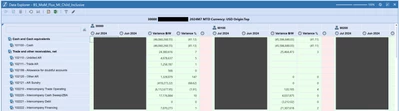
I was able to make it look like this with these columns members.


MeganN_1-1724957412234.png


MeganN_0-1724956850032.png

However, in the original CV we had specific formatting for the Variance B/W and Variance % columns which I cannot figure out how to apply to the multiple items in the nested column member. This is what I have currently for format. This works, but applies the pink formatting across the first 3 columns when I only want it on the Variance B/W column. Is this even possible?

NumberFormat = [#,###,0;(#,###,0);0], If (RowName Contains FSLI) AND (ColName Contains Entity) AND ((CellAmount > 4000000) OR (CellAmount < -4000000)) Then BackgroundColor = Pink

Any ideas or other ways to go about this?

Thanks,

Megan


Best answer by db_pdx

Hi MeganN: you're on the right track, but need to use a slightly different conditional formatting.

If (ColE2HeaderDisplayText = 'Variance B/W') AND ((CellAmount > 4000000) OR (CellAmount < -4000000)) Then
BackgroundColor = Pink
End If

 If we focus on the first conditional:

(ColE2HeaderDisplayText = 'Variance B/W')

This is saying, format based on:

  • Col = Columns
  • E2 = Member Expansion 2
  • HeaderDisplayText = the specific name you're using since you have GetDataCell():Name() 

There are similar versions that can be used on the MemberName or MemberDescription as well: ColE2MemberName, ColE2MemberDescription, respectively.

Let me now if that works for you.  Cheers,    -db

Edit: typos

1 reply

db_pdxAnswer
August 29, 2024

Hi MeganN: you're on the right track, but need to use a slightly different conditional formatting.

If (ColE2HeaderDisplayText = 'Variance B/W') AND ((CellAmount > 4000000) OR (CellAmount < -4000000)) Then
BackgroundColor = Pink
End If

 If we focus on the first conditional:

(ColE2HeaderDisplayText = 'Variance B/W')

This is saying, format based on:

  • Col = Columns
  • E2 = Member Expansion 2
  • HeaderDisplayText = the specific name you're using since you have GetDataCell():Name() 

There are similar versions that can be used on the MemberName or MemberDescription as well: ColE2MemberName, ColE2MemberDescription, respectively.

Let me now if that works for you.  Cheers,    -db

Edit: typos

MeganNAuthor
September 3, 2024

Worked like a charm. Thanks!