June 13, 2025
Solved

Cube View showing amounts loaded into plug account during consolidation

  • June 13, 2025
  • 2 replies
  • 1 view

Hi all,

I recently launched the consolidation process for my client, and the amount under the plug accounts is unusually high.

I would need to develop a cube view showing, for each account in the rows, the amount that was loaded into the corresponding plug account during the consolidation process. 

Is there a way to do that?

Thank you in advance!

Best answer by T_Kress

The intercompany matching reports that are out-of-the-box are enabled on a WF step here:
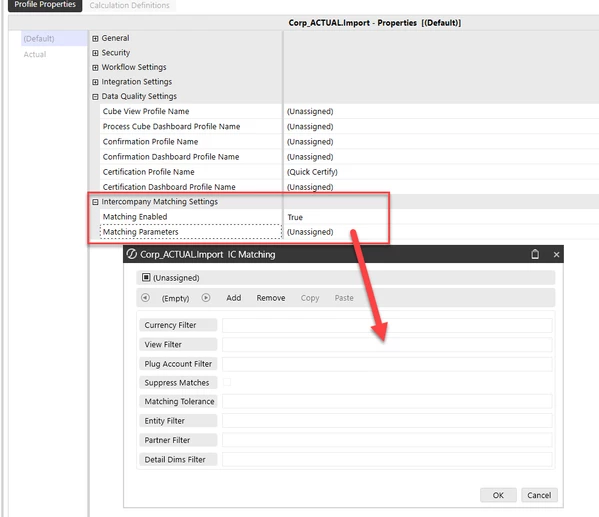


But there are also some in the Standard Application Reports (RPTA) available on the Solution Exchange.  You will go to http://www.onestream.com and log in to the Solution Exchange with your OKTA id.  From there you can find them, download and load into an application.

There is also information in the design and reference guide that describes these.  If you hit the ? in the upper right corner of your application, it will open the document library and from there you can search on "Intercompany Matching".

Intercompany Reports

Intercompany Matching Checklist

This report shows the currently selected workflow's intercompany balances in the specified intercompany plug account. It displays the intercompany matching parameters at the top of the report, and lists each entity using the plug account at their current balances. The currently selected scenario and time period display on the right side of the report header.

For more information, see Intercompany Matching Settings in Workflow in the Design and Reference Guide.

Intercompany Matching Status

This report displays the current workflow's intercompany matching detail information for the specified plug account. Plug account information for each entity includes the reporting, entity, partner currency, the entity intercompany payables and receivables, and their differences. The currently selected scenario and time period display on the right side of the report header.

Intercompany Matching Detail

The Intercompany detail report contains the same data as the matching status report and includes comments for the selected plug account.



2 replies

June 13, 2025

Have you considered using the intercompany matching reports that are part of the WF process, out-of-the-box?  Or the intercompany matching reports you can find in the Standard Application Reports (RPTA) available on the Solution Exchange?  I would leverage those first, before trying to create your own cube view.

fc5Author
June 16, 2025

Hi T_Kress​ , thank you for the help.

Just for confirmation, where can I find the intercompany matching reports you mentioned? Are there default CubeViews already available for this purpose, or do I need to activate or configure them manually?

T_KressAnswer
June 16, 2025

The intercompany matching reports that are out-of-the-box are enabled on a WF step here:


But there are also some in the Standard Application Reports (RPTA) available on the Solution Exchange.  You will go to http://www.onestream.com and log in to the Solution Exchange with your OKTA id.  From there you can find them, download and load into an application.

There is also information in the design and reference guide that describes these.  If you hit the ? in the upper right corner of your application, it will open the document library and from there you can search on "Intercompany Matching".

Intercompany Reports

Intercompany Matching Checklist

This report shows the currently selected workflow's intercompany balances in the specified intercompany plug account. It displays the intercompany matching parameters at the top of the report, and lists each entity using the plug account at their current balances. The currently selected scenario and time period display on the right side of the report header.

For more information, see Intercompany Matching Settings in Workflow in the Design and Reference Guide.

Intercompany Matching Status

This report displays the current workflow's intercompany matching detail information for the specified plug account. Plug account information for each entity includes the reporting, entity, partner currency, the entity intercompany payables and receivables, and their differences. The currently selected scenario and time period display on the right side of the report header.

Intercompany Matching Detail

The Intercompany detail report contains the same data as the matching status report and includes comments for the selected plug account.


fc5Author
June 19, 2025

Thanks a lot for the help!