October 16, 2025
Solved

Cubeview row in different pages

  • October 16, 2025
  • 3 replies
  • 0 views

Hi  i am trying to fit row in one page for display.
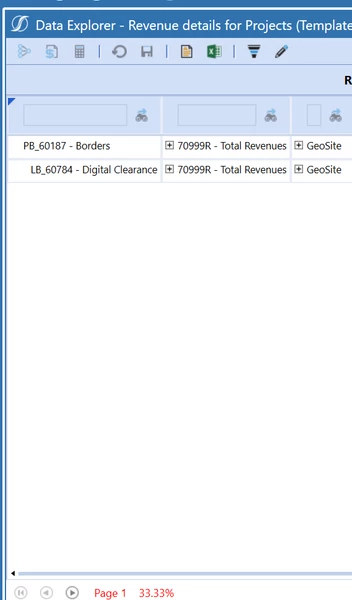


now data is shown in different pages

Best answer by Stefano

If you hoover the red paging text you get some statistics.
Paging will also appear if suppression is set.
You have to look at the paging parameters under CV - Advanced - Cube View Properties

  • Max Unsuppressed Rows Per Page: Determines how many rows are written before the cube view starts paging (default is-1). The maximum value is 100,000
  • Max Seconds To Process: Determines how many seconds the cube view processes before it starts paging (default is -1). The maximum value is 600 seconds.

For the former setting the default means max 2000 rows (expanded) per page, for the latter the default means max 20s1

3 replies

October 16, 2025

perhaps try to experiment with suppression setting. Lmk if that works :)


October 16, 2025

More definition around CV data suppression is referenced here

https://documentation.onestream.com/1384528/Content/Design%20and%20Reference/Cube%20Views/Cube%20View%20Performance.html  

October 18, 2025

Thank you for the suggestion and Design Guide link on Suppression, Avatar-Roku​.
Below are the updated Design Guide links and a QuickTips tutorial video link on Suppression.
OneStream Documentation
Cube View Performance
QuickTips: Cube Views - Row and Column Suppression
"This QuickTips video explores how to use Row and Column Suppression in Cube Views."

StefanoAnswer
October 16, 2025

If you hoover the red paging text you get some statistics.
Paging will also appear if suppression is set.
You have to look at the paging parameters under CV - Advanced - Cube View Properties

  • Max Unsuppressed Rows Per Page: Determines how many rows are written before the cube view starts paging (default is-1). The maximum value is 100,000
  • Max Seconds To Process: Determines how many seconds the cube view processes before it starts paging (default is -1). The maximum value is 600 seconds.

For the former setting the default means max 2000 rows (expanded) per page, for the latter the default means max 20s1