July 10, 2024
Solved

CVR on two row members

  • July 10, 2024
  • 2 replies
  • 0 views

Hi All,

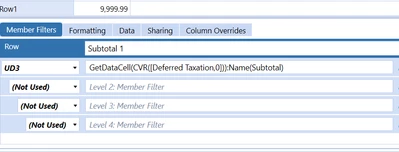
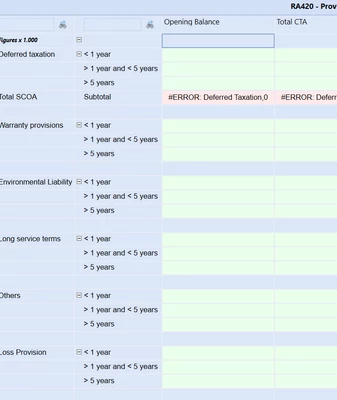
Can somebody maybe help me on this one? I want to add some subtotals in my report but  the problem is that i need to add two members to the CVR formula. So as shown in the formula below not only deferred taxation (account) but also the UD3 (<1 Year) to get the complete data field to sum. How can this be achieved?
jeffvdt_1-1720615144233.png


jeffvdt_0-1720615126359.png


Best answer by Henning

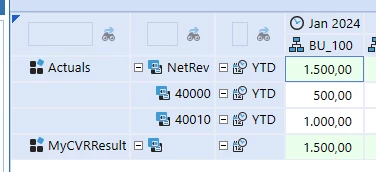
Hi, I am not sure whether I understand the request correctly. I assume you wish to get the sum of all three rows under Deferred taxation, correct? In your description it sounds as if you only want to get the first row.

You should be able to do it e.g. like this:

GetDataCell(S#Actual:A#40000 + S#Actual:A#40010):Name(MyCVRResult)

Henning_1-1720620957644.png

Henning_0-1720620924312.png


2 replies

HenningAnswer
July 10, 2024

Hi, I am not sure whether I understand the request correctly. I assume you wish to get the sum of all three rows under Deferred taxation, correct? In your description it sounds as if you only want to get the first row.

You should be able to do it e.g. like this:

GetDataCell(S#Actual:A#40000 + S#Actual:A#40010):Name(MyCVRResult)

Henning_1-1720620957644.png

Henning_0-1720620924312.png


July 10, 2024

here the function you can try or create a member with formula and pull in cb.

GetDataCell(UD7#membername+UD7#membername):Name(Total)