January 23, 2025

Dashboard - load issue (default parameter value)

  • January 23, 2025
  • 1 reply
  • 0 views


Hi, All - 

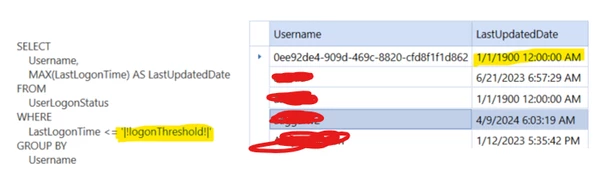
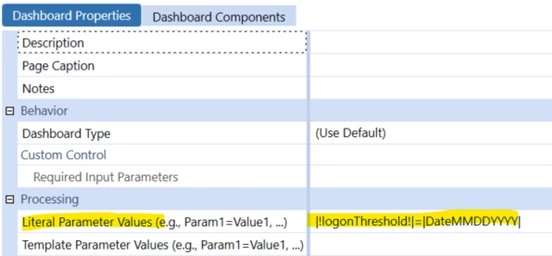
I’ve developed a dashboard that includes a text box, parameter components, and other elements. Users can input a date and click a trigger button to fetch the data, using inbound parameters in the data adapter.

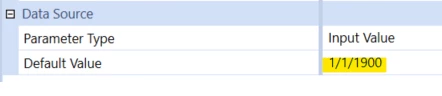
The dashboard is supposed to default to a date value upon loading, but it’s not pulling the expected default from the parameter.

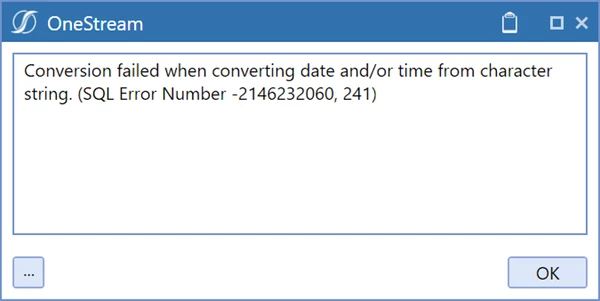
Ideally, the dashboard should open without any issues, but instead, it’s throwing the following SQL error:

"Conversion failed when converting date and/or time from character string. (SQL Error Number -2146232060, 241)"

Currently, the dashboard is not opening and displays the error above.

The data adapter field value format for date is as shown below.

I’ve tried various options for setting the default value in the dashboard parameter, but the issue persists. 

Please let me know if you have any suggestions. thank you !


1 reply

January 23, 2025

Hi Ganeshk12

I think the issue is your sql statement? Since this is a generic sql error

To fix, try to pass in your parameter like this instead.. 

CAST('|!logonThreshold!|' AS DATETIME)

Thanks

Sam

Ganeshk12Author
January 23, 2025

Hi sameburn  - Thank you

I have updated the query like this still having an issue and will try the one you suggested. thank you !


        SELECT 
            Username, 
            MAX(LastLogonTime) AS LastUpdatedDate 
        FROM 
            UserLogonStatus 
        WHERE 
            LastLogonTime <= CONVERT(DATETIME, '|!logonThreshold!|')
        GROUP BY 
            Username


January 24, 2025

I think the problem is that |!logonThreshold!| is not being replaced with the date/time.  Temporarily replace that parameter with the 1/1/1900 12:00:00 AM and confirm it works, as it appears it should.

If the above test does work, then you can move on to figuring out why the dashboard parameter is not being replaced, or is being replaced with some other text string that cannot be resolved to a date/time.

The dashboard parameter will only be substituted if the Adapter is set to CommandType=SQL.  And when you run the adapter, it should display the SQL statement before and after parameter subsitution.

If you are issuing the SQL statement from within a Business Rule, it is on you to take care of constructing the SQL statement with any runtime variables.