
July 10, 2024
Solved

Date Format Change in Report Footer via Cube View Extender + Display Username in Report Footer

  • July 10, 2024
  • 1 reply
  • 0 views

Does anyone know the BR to change the date format of the Cube view Report footer from ("MM/dd/yyyy h:mm:ss tt") to ("dd/MM/yyyy h:mm:ss tt") via Business Rule Cube view extender?

Is there also a rule to show the Username on the Report footer? Would be ideal to show it in the center of the report footer.


Thanks
 

Best answer by T_Kress

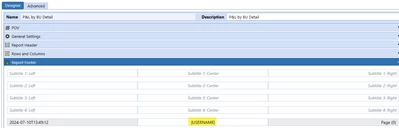
For the user name, you can use the sub var |UserName| in the report footer like this:

T_Kress_0-1720641150850.png

This will come out on the PDF report.  

For the date format still researching.

1 reply

T_KressAnswer
July 10, 2024

For the user name, you can use the sub var |UserName| in the report footer like this:

T_Kress_0-1720641150850.png

This will come out on the PDF report.  

For the date format still researching.

July 10, 2024

There is an enhancement request to have this date footer on reports work off the user's culture code.  It is in Idea Stream here:  (2) JIRA Ticket: PF-4353 (onestreamsoftware.com)

But if you search in One Community you can find an example here:  How to get Date, Time and Time Zone in Report Footer using Cube View Extender Rule. - OneStream Community (onestreamsoftware.com)

AlperenPAuthor
July 11, 2024

The second solution didn't work in the Cube view Extender Rule.

I need the complete Business Rules, which is used within the CV Extender Inline Formula and starts with:

Select Case args.FunctionType

Case Is = CVExtenderFunctionType.FormatReportUIItem

Dim uiItem As CVExtenderReportUIItem = args.Report.CurrentUIItem

If uiItem.UIItemType = XFReportUIItemType.PageFooterDate Then....

Thanks