
December 19, 2023

Define a default grouping using 'Show Group Panel' functionality in Grid View

  • December 19, 2023
  • 2 replies
  • 0 views

Hi

Is it possible to configure default group settings for a grid view?

E.g. I've got a table here, and I'd like to configure the table so that it is grouped by the message column:
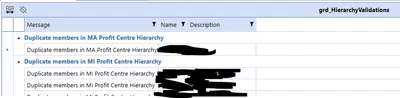
MarkBird_0-1702992205928.png

Regards,

Mark

2 replies

MarkBirdAuthor
December 19, 2023

I have managed achieve this by using a bit of a workaround:

1) Set 'Show Group Panel' to True and 'Save State' to True

MarkBird_0-1702992446043.png

2) Run the Dashboard and set the group by settings as a user'

MarkBird_1-1702992552519.png

3) Set 'Show Group Panel' back to False 

MarkBird_2-1702992608310.png

But this feels very much like a hack...

MarkBirdAuthor
December 19, 2023

It also only works for my user so doesn't really work

December 20, 2023

I have a feeling you'd be happier using a Pivot Grid component for this task. Have you tried it?