
November 21, 2024
Solved

Dynamic Scenario in Cube View columns based on selection

  • November 21, 2024
  • 3 replies
  • 3 views

I know I can have a different scenario where I can combine actuals and forecast each month with data management job and I can use AllPriorYInearInclusive for Actual columns and AllNextInYearInclusive for Forecast to do this when i want just months. But I want to also have quarters summing 3 months potentially actuals and forecast together if date selected is in middle of quarter. And YTD columns summing actuals and forecast.


Below is example of what i want to achieve. Is there CubeView Extender i can build to make this happen.

For Quarter and YTD columns i can just use getdatacell(CVR(Col1)+CVR(Col3)+CVR(Col5)... etc. but i would like to somehow switch actuals to forecast for all future months of WFTime, TimePOV or Parameter selection.
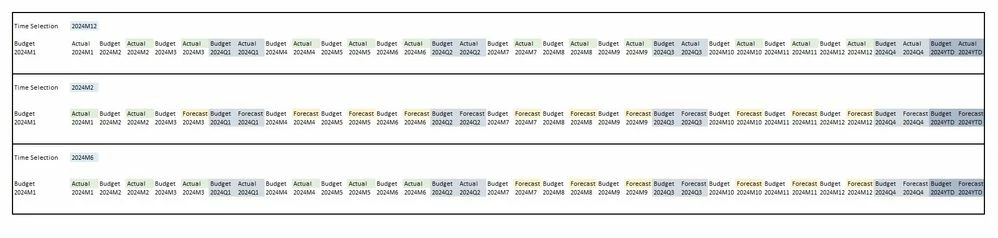

cvexample.JPG

Best answer by imaslyanchuk


Got below code to do what I pretty much needed to do. Found it here in another thread. Still need to tweak it a bit since I dont need it to loop through the list but this code works.

Scenario: xfbr(MyCustomXFBR2, PastCurrActualFutForecast, CurTime=|!GeneralTime!|, ColTimeQuery=[T#|CVYear|M1])

Time: T#|CVYear|M1

Try
			Select Case args.FunctionName
					Case Is = "PastCurrActualFutForecast"
						Dim curTime = args.NameValuePairs.XFGetValue("CurTime")
						Dim curTimeMember As Member = BRApi.Finance.Members.GetMember(si, DimTypeId.Time, curTime)
						Dim colTimeQuery = args.NameValuePairs.XFGetValue("ColTimeQuery")
						Dim colTimeMemberList As list (Of MemberInfo) = BRApi.Finance.Members.GetMembersUsingFilter(si, brapi.Finance.Dim.GetDimPk(si, "Time"), colTimeQuery,False)

						Dim povs As New List(Of String)

						For Each colTimeMember As MemberInfo In colTimeMemberList
							If curTimeMember.MemberId >= colTimeMember.Member.MemberId
								povs.Add($"S#Actual")':T#{colTimeMember.member.Name}")
							Else
								povs.Add($"S#Forecast")':T#{colTimeMember.member.Name}")
							End If
						Next

						Return String.Join(",", povs)
				End Select

			Return Nothing
		Catch ex As Exception
		Throw ErrorHandler.LogWrite(si, New XFException(si, ex))
		End Try


3 replies

December 5, 2024

It may be easier to write an XFBR to return the full filter for that column based on your conditions.

December 5, 2024

Can you point me in the right direction on how i would be able to do this with XFBR?

December 5, 2024

how can i see each columns pov time in cube view with business rule so i can do some logic and compare it to time parameter selection and change scenario for that column?

imaslyanchukAuthorAnswer
December 9, 2024


Got below code to do what I pretty much needed to do. Found it here in another thread. Still need to tweak it a bit since I dont need it to loop through the list but this code works.

Scenario: xfbr(MyCustomXFBR2, PastCurrActualFutForecast, CurTime=|!GeneralTime!|, ColTimeQuery=[T#|CVYear|M1])

Time: T#|CVYear|M1

Try
			Select Case args.FunctionName
					Case Is = "PastCurrActualFutForecast"
						Dim curTime = args.NameValuePairs.XFGetValue("CurTime")
						Dim curTimeMember As Member = BRApi.Finance.Members.GetMember(si, DimTypeId.Time, curTime)
						Dim colTimeQuery = args.NameValuePairs.XFGetValue("ColTimeQuery")
						Dim colTimeMemberList As list (Of MemberInfo) = BRApi.Finance.Members.GetMembersUsingFilter(si, brapi.Finance.Dim.GetDimPk(si, "Time"), colTimeQuery,False)

						Dim povs As New List(Of String)

						For Each colTimeMember As MemberInfo In colTimeMemberList
							If curTimeMember.MemberId >= colTimeMember.Member.MemberId
								povs.Add($"S#Actual")':T#{colTimeMember.member.Name}")
							Else
								povs.Add($"S#Forecast")':T#{colTimeMember.member.Name}")
							End If
						Next

						Return String.Join(",", povs)
				End Select

			Return Nothing
		Catch ex As Exception
		Throw ErrorHandler.LogWrite(si, New XFException(si, ex))
		End Try