July 1, 2025
Solved

Dynamic Short Description for UD3

  • July 1, 2025
  • 2 replies
  • 0 views

Hi 

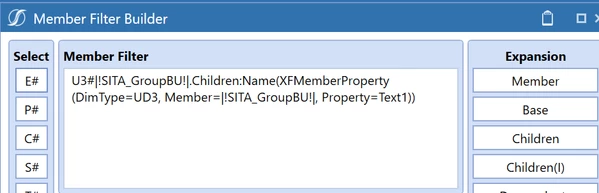
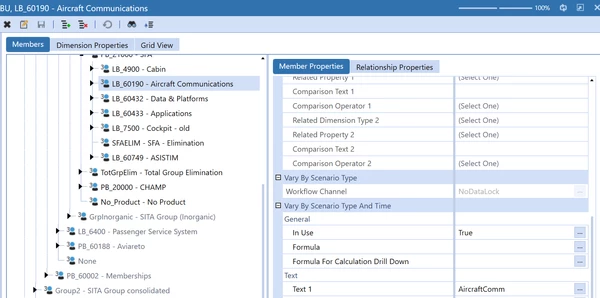
I have been trying to dynamically update the short name for UD3 but somehow the i am not getting the result. Not sure where i am wrong. Please help




Best answer by db_pdx

One small tweak to your XFMemberProperty syntax should be all that is required.

U3#|!SITA_GroupBU!|.Children:Name(XFMemberProperty(DimType=UD3, Member=|MFUD3|, Property=Text1))

2 replies

July 1, 2025

I believe short description only applies to the time dimension & can be edited in Application > Time Profiles.

ShubAuthor
July 1, 2025

How do we do the dynamic short description then without BR.. Such long Description looks odd in PDF any way to make it presentable in PDF format?

July 1, 2025

For time, you would go to you can set the property in the cube view to use short description.  I suppose if you really wanted alternate descriptions for other dimensions you could use the English description as an option.  You could also set the width for the pdf to accommodate.  If it's a big issue maybe discuss with your teams to agree on what items can be abbreviated to fit better. 

db_pdxAnswer
July 1, 2025

One small tweak to your XFMemberProperty syntax should be all that is required.

U3#|!SITA_GroupBU!|.Children:Name(XFMemberProperty(DimType=UD3, Member=|MFUD3|, Property=Text1))
ShubAuthor
July 2, 2025

It works now. Thanks:)