
January 25, 2024
Solved

Excel File in Book

  • January 25, 2024
  • 3 replies
  • 0 views

Hello,

I am trying to insert an excel file (tab) into a book that will export to excel. The purpose of the file is to insert a tab as a separator between report tabs so that the name of this excel tab denotes the type of reports that come next. I am having trouble inserting an excel file so I have created a work around by creating a blank cube view and giving it the output name that I want it to have and then brining that "report" into the book, but I don't feel like I should have to do that. If anyone has any knowledge on adding an excel file to a book, that would be great.

Thanks!
Best answer by AMorgan

Hello lp,

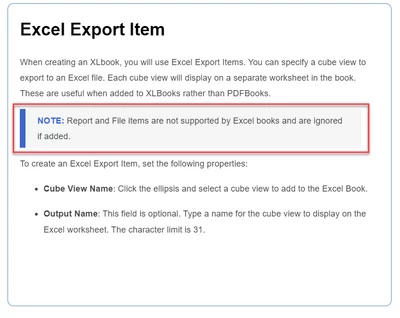
As of now I do not believe you can add file components to a XLBook report book. See design & reference guide:


AMorgan_1-1706286259485.png

I believe your method is the best bet as of now, but I believe there would be enough interest in making an enhancement to address this issue, so it might be worthwhile posting this request in Ideastream. 

Additionally, you might be able to use OpenXML to build the "separator" tabs into your workbook. That would be a heavier up-front task, but if built right, you should be able to reuse the logic and even develop a dashboard to control it all.

-Allen

3 replies

January 26, 2024

Hi lp Is this how you have your setup?  You'll want to create your objects in the Book as Excel Export Item:

MikeG_0-1706281694418.png

This can be a Cube View:

MikeG_1-1706281777706.png

Lastly, how you name the Book file is important, it needs to be an XLBook.

MikeG_2-1706281879445.png

You can create a Loop and use a Loop1Variable as the sheet name, i.e. Entity is the loop member list as Loop1Variable.  If you want to insert a Page Break, I think your method is valid.  I've created Report Book cover pages by using a Report Designer component, that gives you more formatting flexibility on your Page Breaks.

So it would look like this:


MikeG_4-1706282335244.png


Hope this helps,


AMorganAnswer
January 26, 2024

Hello lp,

As of now I do not believe you can add file components to a XLBook report book. See design & reference guide:


AMorgan_1-1706286259485.png

I believe your method is the best bet as of now, but I believe there would be enough interest in making an enhancement to address this issue, so it might be worthwhile posting this request in Ideastream. 

Additionally, you might be able to use OpenXML to build the "separator" tabs into your workbook. That would be a heavier up-front task, but if built right, you should be able to reuse the logic and even develop a dashboard to control it all.

-Allen

lp6Author
January 29, 2024

Thanks for the responses! For now, I will keep my solution as I have already created it but will consider submitting the request to IdeaStream.