
February 28, 2024
Solved

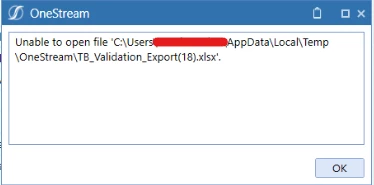
Export a report to Excel Error - Unable to open file

  • February 28, 2024
  • 2 replies
  • 0 views

Hi all, 

I'm encountering an error with one user who is attempting to export a report to Excel. The download process is functioning correctly, and the file is being saved in the OnStream temporary folder. However, the issue arises as OneStream is unable to open the file automatically. It appears to be an issue related to permissions on the user's laptop.

Could not find a way to fix it, any ideas?

Thanks.


GParreiras_0-1709148187372.png


Best answer by JackLacava

OneStream will invoke a standard Windows call to handle the file, i.e. it will push it to Windows and say "open this file with the default program for this extension (xlsx) please". If Windows does not allow that for whatever reason, the operation fails.

Chances are that the laptop is locked down a bit too much by the company sysadmins. You can investigate this with Support, but I would recommend to involve your local IT too.

2 replies

February 29, 2024

Copy the file in some other location and try opening from onestream.

February 29, 2024

Actually, I'm not trying to open the file from OneStream. OneStream automatically attempts to open it after downloading and fails.

March 1, 2024

OneStream will invoke a standard Windows call to handle the file, i.e. it will push it to Windows and say "open this file with the default program for this extension (xlsx) please". If Windows does not allow that for whatever reason, the operation fails.

Chances are that the laptop is locked down a bit too much by the company sysadmins. You can investigate this with Support, but I would recommend to involve your local IT too.

March 1, 2024

Jack, thanks!

December 9, 2024

Hi GParreiras,

We are experiencing the same issue. How was the issue resolved on your side? If permissions, which permissions were changed for it to work?

Thanks