
March 10, 2026
Solved

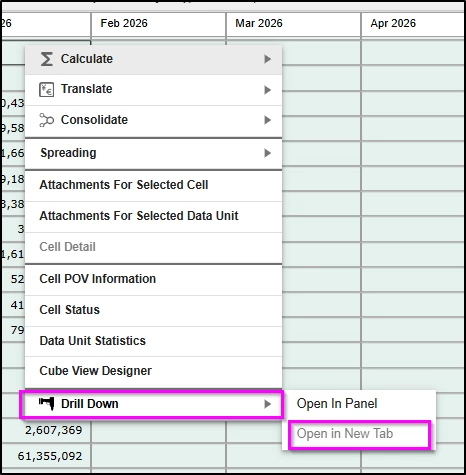
Genesis - Drill down > Open in New Tab

  • March 10, 2026
  • 1 reply
  • 0 views

I am testing out drill functionalities in Genesis and found this "Open in New Tab" being grey out.  I checked the cv in the page and am unable to find any config in this cv that relates to this.  How do I make this option active for use?  it will be really useful to see the drill results in another tab so that it can be view side by side with the original dashboard.


Best answer by JJones

The "Open in New Tab" option is currently grayed out by design at this time as the modern browser experience currently does not support multiple tabs.  This is something that will likely be added in future releases for additional functionality, but is not currently available so the option is grayed out.  You would see this same functionality outside of Genesis as well, as this is in the Cube View itself in the platform and not genesis.

Hope this answers your question.

Thank You


1 reply

JJonesAnswer
March 13, 2026

The "Open in New Tab" option is currently grayed out by design at this time as the modern browser experience currently does not support multiple tabs.  This is something that will likely be added in future releases for additional functionality, but is not currently available so the option is grayed out.  You would see this same functionality outside of Genesis as well, as this is in the Cube View itself in the platform and not genesis.

Hope this answers your question.

Thank You