
January 13, 2025

Guided Reporting: Delimited List displaying Value Items

  • January 13, 2025
  • 3 replies
  • 0 views

Hi

I'm using Guided Reporting to generate a Cube View. Within the Cube View, a parameter (delimited list) is used to show / hide columns. This is working fine.

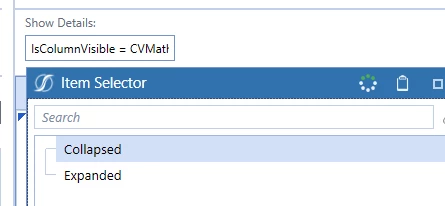
My problem is that in the Selector List, Guided Reporting is showing the Value Item (of the Delimited List) instead of the Display Item. For example, an end-user will select 'Collapsed' (Display Item) but Guided Reporting will show 'IsColumnVisible = CVMathOnly' as the Display Item.

This isn't impacting report functionality, however it looks messy.  


3 replies

January 13, 2025

If you call your parameter like this:

|!!YourParam!!|

instead of like this

|!YourParam!|

It will show the descriptions, not the values.  

January 13, 2025

Hi

Thanks for the quick reply!

I've updated the parameter as per the above in the CV, however, when I rediscover the parameters in Guided Reporting, the parameters are no longer detected as Selector List Items.

Is there another option?

Thanks

January 13, 2025

Hi

Thanks for the quick reply!

I've updated the parameter as per the above in the CV, however, when I rediscover the parameters in Guided Reporting, the parameters are no longer detected as Selector List Items.

Is there another option?

Thanks

April 9, 2025

Hi 

I am facing the same issue. Were you able to find a workaround?

April 10, 2025

Hi bk0615 

I ended up creating a delimited list with 'Collapsed, Expanded' (Display Items) and 'Collapsed, Expanded' (Value Items) so that it looked nice in Guided Reporting. I then called an XFBR in my Column Header Formatting that took the value item and returned the appropriate column visibility settings (e.g. IsColumnVisible = CVMathOnly). 

Not the ideal setup but works as I need it to.
